

Introduction
The alert hits at 7:42 a.m. An unknown login from overseas, followed by a wire transfer request from a junior employee’s account. The password that opened the door was “Welcome2024!” — which looked “professional enough” on paper, but fell in seconds to an automated attack.
This is the hidden cost behind every question about how to create strong passwords, as a research paper on password security recently examined. By 2025, stolen or weak credentials still rank near the top of the causes list for major breaches. For a business, one reused or guessable password can turn into locked systems, frozen cash flow, regulator calls, and tense board updates about “what went wrong.”
We see this pattern repeatedly when working with leaders. Passwords get treated as a small IT detail instead of a primary control. The result is predictable: password reuse across systems, staff choosing formats like “Company2025!”, and attackers using cheap tools to walk straight into email, finance, and cloud admin portals.
In this guide, we walk through seven practical methods that show exactly how to create strong passwords at scale, without turning daily work into a chore. We translate technical rules into steps leaders can sponsor and teams can follow. At VibeAutomateAI, our focus is to narrow the gap between cybersecurity theory and business reality, so by the end of this article you have a clear, actionable blueprint you can roll out across your organization.
Key Takeaways
-
Prioritize Length Over Clever Tricks. For standard accounts, use at least 16 characters; for admin or finance access, aim for 20+ characters. Passphrases make this far more manageable.
-
Never Reuse Important Passwords. Reusing one password across email, cloud, finance, and vendor portals turns a single breach into a chain reaction. Treat zero reuse as a firm rule and back it with tools that make compliance realistic.
-
Treat Password Managers As Core Infrastructure. A password manager generates long random passwords, stores them in an encrypted vault, and syncs them across devices. With a strong master passphrase, it sharply cuts weak passwords, reuse, and support tickets.
-
Combine Passwords With Multi-Factor Authentication. Multi-factor authentication (MFA) adds a second barrier. A stolen password alone should never be enough to move money, access HR data, or change cloud settings.
-
Focus On Human Behavior, Not Just Technology. Training staff on phishing, social engineering, and simple methods for how to create strong passwords gives everyone a clear playbook. Passphrases are often the best balance of strength and memorability for passwords people must recall.
-
Turn Guidance Into Everyday Habit. Throughout this guide, we outline steps leaders can turn into policy, onboarding checklists, and short training sessions so strong password practices move from theory to daily routine.
Understanding Password Vulnerabilities: Why Your Current Approach May Be Failing

Many organizations still rely on password patterns that modern attacks break with ease. Automated tools can test millions of guesses per second, combining dictionary words, dates, and common formats until one hits, as research on password strength has demonstrated. Short passwords, even with a symbol tacked on the end, fall quickly under that pressure.
Credential stuffing raises the stakes. Attackers buy or download credential lists from one breach, then script login attempts across banking sites, corporate email, cloud portals, and SaaS tools. When staff reuse the same email and password across many services, one low-value breach opens a path into high-value systems.
As one security leader told us, “The passwords that worry me most are the ones our people reuse everywhere.”
Even passwords that look strong often are not. Formats like “Company2025!” or “Summer2024!” are exactly the patterns attackers expect: company names, seasons, and years with one symbol added. Social engineering and phishing emails bypass complex passwords as well by tricking people into entering them on fake login pages or sharing them with someone posing as IT.
Behind each successful attack sits a stack of hidden costs: downtime while teams scramble, forensic work to understand what happened, regulator and customer communication, and the long shadow of damaged trust. Without better systems, employees fall back to short or reused passwords because they feel easier, and the organization pays the price later.
The 4 Core Principles Of Unbreakable Passwords

Before diving into methods, it helps to agree on what “good” looks like. When we talk with leaders about how to create strong passwords, we group the requirements into four principles. These give you a shared language with both IT and business teams.
-
Length. Each extra character multiplies the number of guesses an attacker must try. A 16-character password is vastly harder to brute-force than an 8-character one. For high-risk accounts such as finance or cloud admin, pushing length to 20 characters or more buys a lot of extra safety.
-
Complexity. Mixing uppercase letters, lowercase letters, numbers, and symbols increases the possible combinations for each position. This mix disrupts simple dictionary and pattern-based attacks. The goal is not chaos, but enough variety that no single pattern dominates.
-
Uniqueness. If every system uses a different password, a compromise at one vendor does not instantly endanger your payroll, CRM, and email. From a risk view, unique passwords keep incidents contained instead of spreading across your environment.
-
Randomness. Attackers know people pick words, names, keyboard walks, and predictable changes like adding “1” each year. A strong password avoids those human patterns. The seven methods in this guide take these four principles and turn them into practical habits.
Method 1: The Passphrase Strategy – Creating Memorable Yet Powerful Passwords

Passphrases are often the best starting point when teaching staff how to create strong passwords. Instead of one short word with symbols, a passphrase uses four to seven unrelated words in a row. The result is long enough to resist attacks while still easy for a person to remember.
For example, “CoffeeWindowRiverTaxi” already has strong length without feeling impossible to type. Adding another word, such as “CoffeeWindowRiverTaxiGalaxy,” pushes it even further. Where systems allow spaces, something like “quiet rocket lamp green harbor cloud” becomes even longer and still memorable.
The key is randomness between the words. Themes like “cat dog pet vet” are easier for guessing tools to predict. Choose words from very different categories, or from private mental images that do not appear on social media or company sites. Inside jokes that only close family knows often work well.
Passphrases shine for passwords people must remember, such as the master password for a password manager, primary email, or a VPN they type often. If a system insists on numbers or symbols, you can weave them into the phrase in a way only your team understands. The rule to repeat is simple: one account, one passphrase, never reused.
Method 2: The Mnemonic Approach – Transforming Sentences Into Secure Codes
Some people remember stories better than random words. For them, mnemonics offer a powerful method for how to create strong passwords. The idea is to take a sentence that means something to you and shrink it into a code by using the first letter of each word, keeping numbers and punctuation.
Imagine the sentence “Our first office opened in Dallas in 2016, and we grew fast.” This can become “OfooiDi2016,awgf.” To an attacker, that string looks like random text. To the person who created it, the full sentence makes recall easy.
This method works best when the sentence is not a famous quote or a line that appears on your website or LinkedIn profile. You want something personal enough that only the user would think of it. Eight to fifteen words usually give a good length once compressed.
To push security higher, keep capital letters where they appear in the sentence and keep commas, exclamation marks, and numbers. This keeps the password long, complex, and still tied to a story in the user’s mind. It is a great fit for accounts people log into very often, like email or workstations.
Method 3: Random Character Generation – Maximum Security For Critical Systems
For your most sensitive systems, the safest answer to how to create strong passwords is often a truly random string. These passwords use mixed characters with no words, patterns, or meaning. To a human they look messy, which is exactly what you want when defending against powerful guessing tools.
Examples might look like “nB7v!qR2zP4w#cLm” or “Qe9$uM3xTa1%Hr8Gs0.” At twenty characters or more, these become extremely hard to crack by brute force. Attackers cannot lean on dictionaries or human habits, because no readable pattern exists.
The tradeoff is memorization. Very few people can remember more than one or two strings like this without writing them down, which adds new risks. This is where password managers come into play. They can generate, store, and fill these strings on demand, so staff never need to memorize them.
We recommend random strings for systems where a breach would be severe: banking portals, payroll, cloud admin consoles, HR databases, and identity providers. Within those tools, set length defaults as high as the system allows so your highest-value accounts become the hardest ones to guess.
Method 4: The Substitution Technique – Elevating Common Phrases With Strategic Replacements
The substitution method sits between pure passphrases and full randomness. It starts with a base phrase that is easy to remember, then replaces parts of it with numbers or symbols according to rules only the user knows. Done well, this adds strength without losing memorability.
For instance, someone might start with “BlueCarDrivesFastOverBridge.” They could decide every “a” becomes “4,” every “o” becomes “0,” and every space becomes “%” when allowed. That turns the phrase into something like “BlueC4rDrivesF4st0verBridge.” The phrase still connects back in the user’s mind.
The trap to avoid is using the most obvious swaps that attackers already expect. Replacements such as “password” becoming “P@ssw0rd” show up in nearly every attack wordlist. If a pattern feels common, it probably is. Personal rules that mix in less common symbols or change more than one letter work better.
We see this method help teams moving away from weak passwords for the first time. It lets people keep a mental hook while raising length and complexity. For stronger protection, combine substitution with passphrases or mnemonics, and always keep each password tied to only one account.
Method 5: The Password Manager Integration – Scaling Security Across Your Organization

At a certain size, no team can keep track of dozens or hundreds of long passwords by memory. This is why we tell leaders that password managers are now basic security plumbing, not an optional add-on. They make it possible to follow every rule in this guide without slowing the business down.
A password manager stores all credentials in an encrypted vault protected by one very strong master password or passphrase. It can:
- Generate long random passwords
- Fill them in on websites and apps
- Sync them across laptops and phones
- Flag weak or reused passwords
- Warn you when a saved login shows up in a known breach
From a business angle, following the 15 password management best practices delivers clear gains. Teams stop reusing the same password across tools. Help desks spend far less time on reset requests. When an employee leaves, access can be removed in one place rather than hunting through old spreadsheets and sticky notes. Shared vaults let teams use common accounts without ever emailing passwords.
“The only secure password is the one you don’t have to remember.” — Common security saying
When choosing an enterprise manager, look for strong encryption (such as AES‑256), external security audits, single sign-on integration, and clear reporting. At VibeAutomateAI, we often help leaders map password manager rollouts into their wider risk plans, incorporating best practices for creating secure master passphrase rules, MFA on the manager itself, and recovery procedures. With that foundation in place, your people can follow strong password practices by default instead of by exception.
Method 6: Strategic Password Rotation – When And How To Update Credentials
For many years, standard advice pushed staff to change passwords every 60 or 90 days. Current guidance from NIST and other bodies now takes a different view. Forced frequent changes often lead people to take shortcuts like “FinancePassword1” becoming “FinancePassword2,” which helps attackers more than it helps you.
We now focus on changing passwords when there is a real reason. That includes:
- Signs of unusual activity
- A confirmed or suspected breach at a service provider
- An employee with access leaving the company
- Any case where a password had to be shared in an emergency
When you do change a password, treat it as a fresh start rather than a small tweak. New passwords should be built from different phrases or sentences, not just adjusted versions of old ones. Password history features that block repeats help enforce this standard.
Alongside event-driven changes, periodic reviews using reports from your password manager can help spot weak or reused entries before attackers do. This style of rotation keeps effort focused where it reduces risk instead of asking people to redo strong passwords without cause.
Method 7: Multi-Factor Authentication Multiplication – Amplifying Password Strength
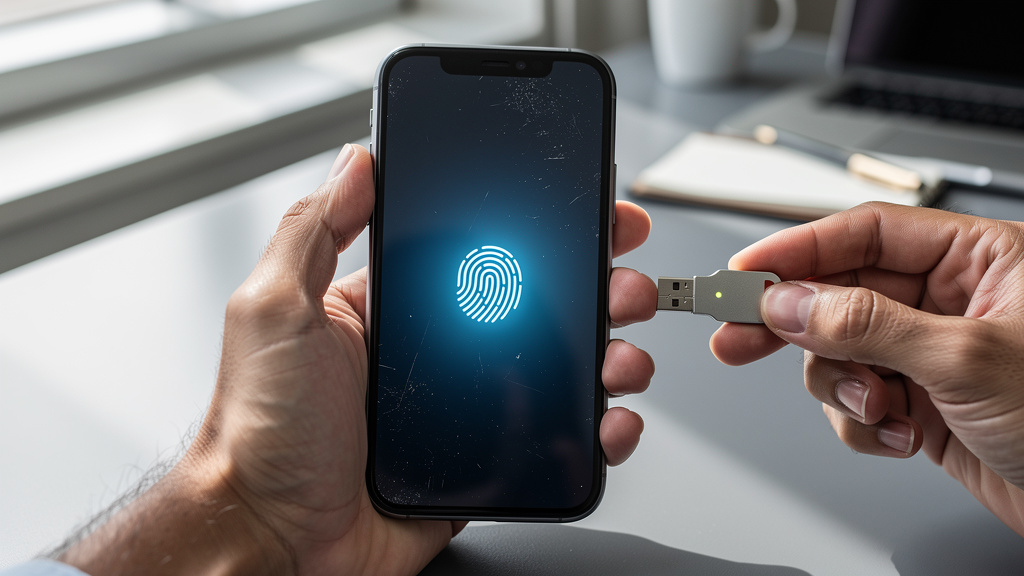
Even the best password can be stolen through phishing, malware, or a reused password at another service. Multi-factor authentication (MFA) adds a second gate, so a password alone is not enough. You combine something you know with something you have or something you are.
Common second factors include text message codes, authenticator app codes, hardware security keys, and biometric checks like fingerprints. Text messages are easy to deploy but can be attacked through number hijacking. Authenticator apps raise the bar by keeping codes on the device. Hardware keys go further, because an attacker needs the physical key to log in.
We recommend starting MFA rollouts with email, financial tools, cloud platforms, and admin accounts. From there, expand to any service that supports it. Set clear rules on backup methods so staff do not get locked out, and train them to watch for random approval prompts that might signal an attacker trying to trick them.
Modern MFA fits smoothly into daily work for most people, especially when biometrics or hardware keys are in play. In 2025 and beyond, combining strong passwords, managers, and MFA is one of the most effective ways to raise the effort and cost of attacking your organization.
Critical Mistakes That Undermine Even Strong Passwords
Good passwords lose their value when everyday habits weaken them. We often see the same patterns across companies, even when leaders think they have “strong password policies” on paper. Cleaning up these behaviors is just as important as improving creation methods.
-
Using Personal Information. Names, birthdays, addresses, sports teams, and pet names all appear in public records or social posts. When staff base passwords on this data, targeted guessing tools have a much easier job.
-
Sharing Passwords Insecurely. Sending passwords through email, chat tools, or casual conversation spreads risk. Messages can be forwarded, inboxes can be hacked, and calls can be overheard. Use password manager sharing features instead.
-
Writing Passwords Near Devices. Sticky notes on monitors and notebooks on desks create an easy win for anyone with physical access. Cleaning staff, visitors, or a disgruntled insider can photograph those notes in seconds.
-
Reusing Variations Across Accounts. Patterns such as “CompanyApp1,” “CompanyApp2,” and “CompanyApp3” only create the illusion of safety. Once one password leaks, an attacker can walk up that chain in minutes.
-
Ignoring Breach Alerts. Many browsers and managers now flag exposed or weak passwords. Clear internal rules about responding to these alerts turn them from noise into a fast defensive step.
-
Weak Security On Mobile Devices. Phones often auto-sign into email, storage, and messaging apps. Simple four-digit codes or no screen lock at all give attackers an easy path. Strong phone locks and remote wipe options close that gap.
Defending Against Social Engineering And Phishing Attacks
Attackers often skip hard technical work and aim straight at people. Social engineering uses trust, fear, and urgency to talk staff into handing over passwords or clicking harmful links. Even if you teach everyone how to create strong passwords, these tricks can still open the door.
“Amateurs hack systems; professionals hack people.” — Common saying in security circles
Common examples include emails that seem to come from a CEO asking for an urgent password reset, fake IT messages claiming “your mailbox is full,” or fake vendor invoices that link to look‑alike login pages. Sometimes attackers even take over one colleague’s email and send harmful links to the whole team, counting on trust between co‑workers.
Clear verification habits cut through this. Staff should never share passwords in response to an email, call, or chat, no matter who asks. Any request that touches access or money should be checked through a second path such as a direct call to a known number. Training people to read web addresses carefully and to use bookmarks for important sites cuts down on fake page logins. Regular awareness sessions and controlled phishing tests help teams practice spotting these tricks and turn staff into active sensors who report threats early.
Implementing An Enterprise Password Policy: A Framework For Leadership
Strong passwords across an organization do not happen by accident. They come from clear policy, leadership support, good tools, and steady communication. When we work with executives on how to create strong passwords at scale, we frame it as a core part of risk policy, not just an IT standard.
Developing a robust and comprehensive policy covers minimum lengths (for example, 16 characters for normal accounts and 20 or more for privileged access). It spells out complexity rules, bans password reuse across systems, and sets expectations that MFA is turned on wherever it is offered. It also calls for a standard password manager for all staff and defines how the company responds to breaches or alerts.
Change management matters just as much as the rules. Rolling out a manager, updating password rules, and turning on MFA works best in stages, with clear messages about why the changes help the business. When executives use the same tools and share their own experience, staff buy‑in rises. Providing guidance and quick training before enforcing new rules keeps frustration down.
Enforcement should blend technical controls with ongoing education rather than just punishment. Regular reviews help keep the policy aligned with new standards and new systems, ensuring alignment with 15 password management best practices established by industry leaders. At VibeAutomateAI, our content is built to give leaders the language and frameworks to document these policies in ways that support certifications and regulations while still making sense to non‑technical teams.
Conclusion
Passwords sit at the front door of almost every system that matters to your business. Treating them as a side detail leaves that door half‑open. When leaders take password strength seriously, they are really taking financial stability, customer trust, and operational continuity seriously.
We covered seven methods that work in real organizations. Passphrases and mnemonics give staff simple ways to create long, memorable passwords. Random strings and substitution patterns raise the bar further for high‑risk accounts. Password managers and thoughtful rotation practices keep the system manageable at scale. Multi-factor authentication then adds another wall behind every password.
The real power comes from combining these methods into one set of habits and tools. Strong creation methods, backed by a password manager and protected with MFA, give attackers a much harder target. The next practical step is clear: audit your current password practices, pick an organization‑wide password manager, and turn on MFA for your most important systems this week.
At VibeAutomateAI, we focus on turning complex security topics into clear guidance leaders can act on. Strong passwords are not just a security measure; they are a quiet enabler of confident growth. Putting these methods in place now is an investment in fewer crises and a more resilient future.
FAQs
Question 1: How Long Should A Business Password Really Be In 2025?
For 2025, we recommend at least 16 characters for standard business accounts. Administrative, financial, and other high‑privilege logins should use 20 characters or more whenever systems allow it. Modern guidance, including NIST, favors length as a key strength factor. With a password manager in place, there is little reason to stay short.
Question 2: Are Password Managers Actually Safe For Storing All Our Business Credentials?
Well‑known password managers use strong encryption such as AES‑256 to protect stored data. Many follow a zero‑knowledge design, which means the provider cannot see your passwords, even if their servers are breached. The risk from reused, weak, or emailed passwords is far higher than the risk from a properly chosen manager. Look for tools with third‑party security audits, clear incident response practices, and add MFA to the manager itself for another layer of protection.
Question 3: Should We Require Employees To Change Passwords Every 90 Days?
Current NIST guidance no longer supports fixed‑period changes like every 90 days for all accounts. Forced schedules often lead to simple patterns, such as adding a number at the end each time, which weakens security. Password changes matter most when there is a sign of compromise, a breach notice, or a staff departure. Focus policy on strong initial passwords, zero reuse, and wide MFA use rather than calendar‑based resets.
Question 4: What’s The Best Way To Share Passwords Securely Within Our Team?
Sharing passwords through email, chat, or verbal messages creates many paths for leaks and misunderstandings. A better approach is to use an enterprise password manager that offers secure sharing between accounts while keeping the password itself hidden. These tools can also give temporary access that you can remove when a project ends or a role changes. For highly sensitive systems, consider privileged access management tools that give just‑in‑time access without sharing passwords at all.
Question 5: How Do We Handle Password Requirements For Older Systems That Have Character Limits Or Restrictions?
Legacy systems with short length limits or narrow character sets are a common pain point. In those cases, use the longest password the system allows and still mix character types as much as possible. Pair that with MFA and tight access controls as extra protection around the weak spot. Include these systems in your technology roadmap so they are modernized or replaced over time, since long‑term reliance on them keeps overall risk higher than it needs to be.
Stay connected