

Introduction
A finance director gets an email from the CEO late on a Friday.
There’s a rush request for a wire transfer, the wording sounds right, and the email address looks close enough.
Five minutes later, six figures are gone, and all technical defenses did nothing to stop it.
That’s how many social engineering attack types work. They don’t break firewalls or crack encryption. They talk people into opening the door for them. According to the Verizon Data Breach Investigations Report, around 60 percent of breaches involve a human element, which means an attacker talked, tricked, or pressured someone into doing something they shouldn’t have done.
“Amateurs hack systems; professionals hack people.” — Bruce Schneier
As business leaders, IT managers, and security teams, we often pour money into tools, yet attackers focus on people instead. They study how teams communicate, how approvals work, and which messages look “normal.” Once they have one set of credentials, they can move quietly through email, cloud apps, and internal systems while everything appears legitimate.
At the same time, both attackers and defenders now use AI. Threat actors use generative AI to create polished phishing emails and fake messages at scale. On the other side, we can apply AI and automation to spot strange behavior, guide employees in the moment, and react far faster than manual teams ever could.
In this guide, we at VibeAutomateAI walk through the main social engineering attack types, how they work, the red flags to watch for, and how to build multi-layered defenses using people, process, and AI. By the end, you’ll have a clear, practical playbook to protect your organization and turn employees into your strongest security asset.
Key Takeaways
- Social engineering attacks target people, not code. Even the best technical tools fail if people are rushed, scared, or confused. When we understand the main social engineering attack types and the emotions they exploit, we can design training, approvals, and checks that match real behavior instead of assuming perfect users.
- Most attacks follow a repeatable cycle. Research, contact, manipulation, and expansion form a pattern. When we learn to spot signs at each stage—from odd information requests to sudden payment changes—we get more chances to stop attacks before money leaves the bank or data leaves the network.
- Common social engineering attack types include phishing, spear phishing, whaling, Business Email Compromise (BEC), smishing, vishing, pretexting, baiting, quid pro quo, scareware, tailgating, and watering hole attacks. Each has telltale signs, like sudden urgency, unusual channels, or requests that break normal business rules, which leaders can fold into policies and staff training.
- Effective defense is layered. A strong setup mixes technology, training, and culture instead of relying on any single tool. AI-driven monitoring, multi-factor authentication, and access controls help, but employees who feel safe reporting mistakes and know what to look for are the real game changers.
- VibeAutomateAI focuses on clear, human-centric guidance. We provide frameworks for AI-powered learning platforms, governance, and incident response so leaders can use automation to support people, keep humans in charge of key approvals, and avoid new AI-driven risks like hallucinations or prompt injection.
What Is Social Engineering? Understanding the Human Attack Vector
Social engineering is the use of psychological tricks to get people to do something that harms security. Instead of attacking code or hardware, criminals go after emotions such as trust, fear, urgency, curiosity, and empathy. When someone believes they’re helping a colleague, avoiding trouble, or chasing a great offer, they’re far more likely to click, share, or approve without thinking deeply.
Human error is easier to predict than technical flaws. Most staff members answer emails quickly, want to help senior leaders, and don’t want to slow down important work. Attackers study these habits and build messages that fit normal patterns just well enough to slip through. That’s why so many social engineering attack types succeed even in organizations with strong firewalls and encryption.
In many cases, the target is an authorized user with the right access. Once that person shares their password or approves a fake payment, the attacker holds real credentials and looks like a normal employee in logs. This creates stealth, because standard security tools often trust whoever appears to log in correctly.
Social engineering attack types also scale very well. An attacker can:
- Send millions of basic phishing emails, hoping a few people click, or
- Craft a handful of highly targeted messages to people with special access.
Both tactics can work, and both cut straight around many traditional defenses. That’s why technical controls are necessary but not enough on their own; we need people and processes designed with real human behavior in mind.
“The weakest link in the security chain is the human element.” — Kevin Mitnick
The Four-Stage Social Engineering Attack Cycle
Behind most social engineering attack types is a simple, repeatable cycle. When we understand this cycle, we can spot trouble earlier and design controls that interrupt it.
- Information Gathering (Reconnaissance)
Attackers search social media, company websites, press releases, and public filings to learn who does what, which vendors you use, and how your teams talk. They look for:- Email formats and job titles
- Project names and current initiatives
- Personal details like hobbies or family events
These small details make later messages feel more real.
- Establishing A Relationship (Pretext Creation)
The attacker crafts a believable story and identity, such as an auditor, vendor account manager, or member of the IT team. They may:- Send a friendly introduction email
- Call the office posing as support staff
- Connect on LinkedIn with a convincing profile
This step lowers natural defenses and makes later requests feel like part of an ongoing conversation.
- Exploitation (The Ask)
Here, the attacker sends the actual request they need to move forward. That might be:- A link to a fake login page
- A request for updated bank details
- A prompt to install “remote support” software
The message often leans on urgency, authority, or fear so the target reacts quickly and skips normal checks.
- Execution And Expansion
After the victim clicks, shares, or approves, the attacker reaches their main goal, such as gaining access to email, planting malware, or receiving funds. From there, they may:- Quietly move through other systems
- Read internal mail to refine future attacks
- Change more payment details to repeat the scam
Detection at any stage can stop the chain, which is why awareness and monitoring matter so much.
12 Common Social Engineering Attack Types Every Organization Must Defend Against
Social engineering attack types come in many flavors, but most large incidents tie back to a core set of patterns. By learning how each works, we can design clear guardrails, training points, and checks for our teams.
1. Phishing: The Most Prevalent Digital Threat
Phishing is the broad, mass-market version of social engineering where attackers send deceptive messages over email, text, or social media. Older phishing attempts were full of spelling errors and wild promises, but modern ones copy real brands and internal messages very closely.
They often:
- Link to fake login pages
- Attach malware files
- Claim to fix an urgent account or payment problem
Red flags include:
- Links that don’t match the displayed text
- Pressure to act fast
- Any request to enter credentials after clicking
2. Spear Phishing: Precision-Targeted Attacks
Spear phishing is a more precise form of phishing that focuses on one person or a small group. Attackers first research their targets, studying public profiles, company pages, and past communications to copy writing styles and topics.
They may pretend to be:
- A direct manager
- A key supplier
- An internal project lead
Because messages use real names, current projects, and familiar phrases, they feel personal and far more believable than generic spam.
3. Whaling: Targeting C-Suite Executives
Whaling is spear phishing aimed at senior leaders such as CEOs, CFOs, and board members. Attackers map reporting lines, public speaking events, and media quotes to shape very detailed messages.
Common stories involve:
- Urgent acquisitions or deals
- Unexpected audits
- Private legal matters that “must be handled quickly and quietly”
Since these leaders often have wide access and authority, one successful whaling email can expose large sums of money or very sensitive data, which makes this one of the most dangerous social engineering attack types for leadership teams.
4. Business Email Compromise (BEC): The $55 Billion Threat
Business Email Compromise (BEC) happens when attackers either take over a real corporate mailbox or forge messages that appear to come from it. Instead of sending obvious malware, they send plain-text instructions that match normal business processes, such as changing bank account details or approving a wire transfer.
This approach often slips past standard email filters because nothing looks technically malicious. From 2013 to 2023, BEC attacks led to more than 55 billion dollars in reported losses, and recent studies show they now make up a large share of incident response investigations.
5. Smishing (SMS Phishing): Mobile-First Attacks
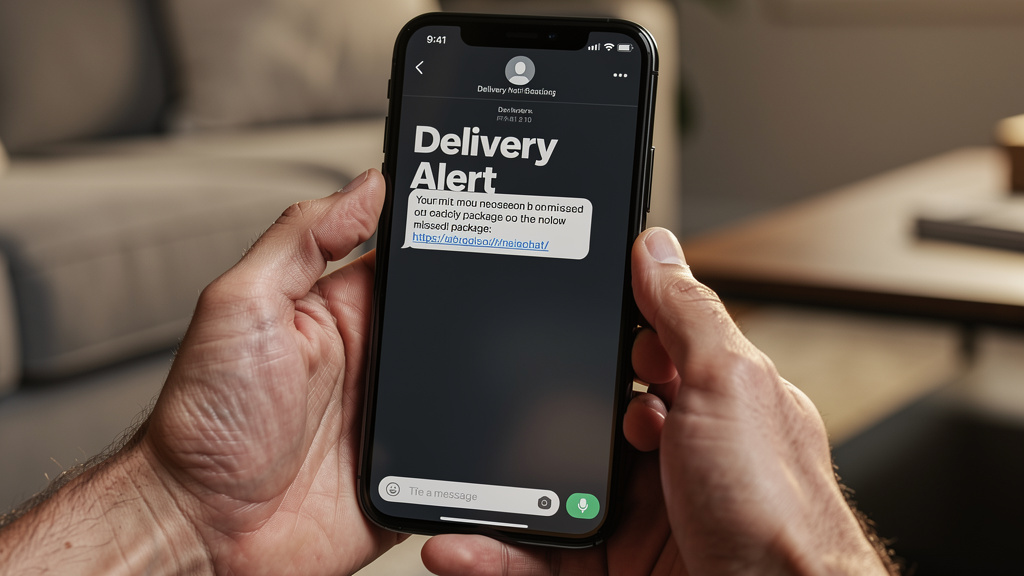
Smishing uses text messages instead of email to trick victims. People tend to trust texts and glance at them quickly, which gives attackers an advantage. Common themes include:
- Package delivery issues
- Bank alerts
- Tax refunds
- Fake multi-factor authentication prompts with links attached
As more business happens on mobile phones, smishing has grown fast, so any text that mixes urgency, links, and requests for login details should raise concern.
6. Vishing (Voice Phishing): Phone-Based Social Engineering

Vishing relies on phone calls where the attacker pretends to be someone trustworthy. They often spoof caller ID to show the name of a bank, government office, or internal department. Some groups also use recorded voices or call-center style scripts to sound polished.
Vishing often pairs with earlier phishing emails so the caller can reference a “ticket number” or “case file,” which makes the story feel more real and pressures the target to share sensitive details.
7. Pretexting: Fabricated Scenarios for Information Extraction
Pretexting means building a detailed fake story to justify asking for information or access. The attacker may act as:
- An outside auditor
- A police officer or regulator
- A vendor account manager
- A senior executive needing help while traveling
They use small true details learned during research to make the story believable, then slowly ask for usernames, contracts, or internal records. Pretexting can happen by email, phone, or in person and often underpins other social engineering attack types.
8. Baiting: Luring Victims with False Promises
Baiting offers something tempting in return for an action that harms security. Online, that might be free software, gift cards, or entertainment downloads that hide malware or data-stealing forms.
In the physical world, attackers may leave USB drives or other devices in parking lots, elevators, or lobbies, counting on curiosity to do the rest. Once someone plugs in the device or downloads the file, malware can install quietly, giving attackers deeper access.
9. Quid Pro Quo: Deceptive Service Exchange
Quid pro quo attacks work by promising help or a reward in exchange for sensitive information. A typical example is a fake tech support person calling employees and offering to fix a problem they didn’t know they had.
During the call, the attacker may:
- Ask for login details
- Instruct the user to disable security tools
- Request that the user install remote access software
Staff who want to be helpful or get quick assistance may comply without checking whether the caller is real.
10. Scareware: Fear-Based Manipulation
Scareware attacks pop up sudden warning messages that claim a device is infected or under attack. These alerts often use bright colors, loud sounds, and countdown timers to trigger panic. Victims are told to download a “fix” or call a phone number for help, but the result is usually stolen payment data, real malware, or both.
The goal is to make people act fast before they can think, which is common across many social engineering attack types.
11. Tailgating/Piggybacking: Physical Access Attacks

Tailgating, also called piggybacking, happens when an unauthorized person slips into a secure area by following someone with valid access. The attacker might:
- Wear a delivery uniform
- Carry boxes or equipment
- Claim they left a badge at their desk
Once inside, they can steal laptops, copy documents, or plug malicious devices into the network. Some attackers also ask to “borrow” a workstation for a minute, which lets them install remote access tools in seconds.
12. Watering Hole Attacks: Strategic Website Compromise
In a watering hole attack, criminals don’t come to the victim directly. Instead, they compromise a website that their targets visit often, such as a trusted industry portal or partner login page. They plant code that silently collects credentials or installs malware whenever someone from the target organization visits.
Because the site is familiar and often bookmarked, staff rarely suspect anything, which makes this one of the more subtle social engineering attack types to detect.
How To Detect Social Engineering Attempts: Recognition And Red Flags
Detection starts with spotting patterns that don’t match normal behavior. Nearly all social engineering attack types share several warning signs, even if the channel or story changes. When people across the organization learn these patterns, they can pause before responding and check whether a request is real.
Key red flags include:
- Urgency and pressure – Messages that demand action “right now” or claim disaster will follow if you stop to check.
- Emotional manipulation – Strong fear, flattery, shame, or excitement that feels out of proportion to the request.
- Requests that break normal rules – Asking for passwords, direct bank detail changes, or payment approvals that skip usual tickets and systems.
- Mismatched sender details – Display names that don’t match email addresses, strange phone numbers, or links that point to domains you don’t recognize.
- Odd attachments or links – Files you didn’t expect, or login prompts that appear after clicking on links in messages.
Simple habits help as well:
- Hover over links before clicking to see where they really go.
- Check for secure HTTPS connections and correct domains.
- Read email headers or call logs when something feels off.
The most important habit is the “pause and verify” principle. Staff step back and confirm through a separate channel—such as calling a known number or checking a case in the official system—before acting.
AI-powered tools can add another layer by watching for:
- Strange login patterns
- Unusual payment flows
- Messages that sit outside normal writing style or behavior
These tools can flag suspicious events for human review, giving security teams more chances to intervene before serious damage occurs.
Building Multi-Layered Defense: Technology, Training, And Culture
Defending against social engineering attack types means combining tools, education, and strong habits. No single product will fix the problem, because the attacker’s target is the person, not just the device. We need controls that help staff do the right thing, catch mistakes early, and respond quickly when something slips through.
Technical Security Controls
Technical controls give us guardrails and alarms when social engineering attempts lead to risky actions. Helpful measures include:
- Advanced email security – Filters that scan for suspicious patterns, block known phishing kits, and warn users when messages come from outside the organization but pretend to be internal.
- Multi-factor authentication (MFA) – Extra login checks across key systems so stolen passwords alone aren’t enough to gain entry.
- Strong access management – Applying the principle of least privilege so each account only reaches the data and systems needed for its role, which limits damage if one person is tricked.
- Endpoint and network monitoring – Tools that spot unusual behavior such as logins from odd locations, sudden data exports, or attempts to disable security controls.
- Regular patching and browser protections – Keeping software up to date and using pop-up blockers and safe browsing settings to make scareware and watering hole attacks harder to pull off.
These controls don’t replace user awareness, but they create extra hurdles and early warnings when something goes wrong.
Security Awareness Training And Culture

Even the best tools fail if people are afraid to speak up or don’t know what to look for. That’s why training and culture are central to any defense against social engineering attack types.
Stronger programs tend to:
- Use short, regular lessons instead of one long annual session
- Show real examples from email, chat, text, and phone calls
- Cover current attacks, including AI-generated phishing and BEC
Simulated phishing and vishing exercises help staff practice in safe conditions, and the results highlight where more help is needed.
A positive, blame-free reporting culture is just as important as the training itself. When employees can admit a mistake right away without fear, the security team can:
- Contain the issue quickly
- Change passwords or revoke tokens
- Alert others before the attack spreads
At VibeAutomateAI, we focus on AI-powered learning frameworks that automate much of this work. Our guidance covers how to set up platforms that:
- Enroll new hires automatically
- Schedule refreshers and recertification
- Track progress and skills over time
We also provide playbooks for building awareness programs that treat employees as the largest underused security resource, rather than the weakest link, and align training with real business processes.
AI And Automation For Enhanced Defense
AI adds real value when it supports people instead of replacing them. Security teams drown in alerts and logs, while attackers move quickly, so automation helps by scanning huge data sets for patterns that humans would miss or notice too late.
For social engineering attack types, AI can:
- Flag odd payment or vendor changes
- Spot unusual login paths or device combinations
- Highlight message wording that differs sharply from normal communication patterns
VibeAutomateAI provides frameworks that show leaders how to weave AI into monitoring, training, and incident response while keeping humans in control of key approvals. We highlight risks such as AI hallucinations and prompt injection so teams don’t treat AI output as unquestioned truth.
The goal is a balanced setup where automation handles speed and volume, and trained people apply judgment and context for final decisions.
Conclusion
Social engineering will always be with us because it targets the one part of security that never goes away: human nature. Attackers know that even smart, careful people can be rushed, tired, scared, or simply polite, and they design social engineering attack types to take advantage of those moments. Firewalls and antivirus are still needed, yet they can’t protect against an employee who believes a fake request is real.
The safest organizations accept that people are both the main entry point and the strongest shield. With clear training, simple rules, and a culture that rewards fast reporting, employees become active defenders instead of quiet risks. AI and automation then act as force multipliers, watching for strange patterns, guiding staff at the right time, and helping security teams move faster than they could alone.
At VibeAutomateAI, we focus on making AI, automation, and security practices understandable and workable for real businesses. Our guides, governance frameworks, and learning playbooks help leaders build a security-aware culture that fits their size, sector, and risk appetite. When organizations invest in both their people and smart automation, they’re far better prepared to detect, resist, and recover from social engineering attacks.
FAQs
Question 1: What Makes Social Engineering Attacks More Dangerous Than Technical Hacking?
Social engineering goes around technical defenses by convincing real people to help the attacker, often without knowing it. Once criminals gain valid credentials, they look like normal users in most logs, which makes detection harder. Studies show that around 60 percent of breaches involve a human element. It’s also easier and cheaper for attackers to send convincing messages than to find and exploit difficult technical flaws.
Question 2: How Can Small Businesses Defend Against Social Engineering Without Large Security Budgets?
Smaller organizations can make strong progress with low-cost steps:
- Run regular, plain-language security awareness training that teaches staff how to spot common social engineering attack types.
- Turn on multi-factor authentication for cloud services and remote access to reduce the impact of stolen passwords.
- Build an open culture where employees feel safe asking questions and reporting odd messages.
This kind of culture costs nothing but can prevent major losses. VibeAutomateAI offers frameworks and guides that help organizations of all sizes design training and AI use that match their budget and risk level.
Question 3: What Should An Employee Do Immediately After Falling For A Social Engineering Attack?
The most important step is to report what happened right away to the IT or security team, even if it feels embarrassing. Fast reporting lets the team:
- Reset passwords or revoke tokens
- Cancel or recall payments if possible
- Block further access and warn others
The employee should note what they clicked, what information they shared, and any files they opened. Organizations should praise quick reporting, since hiding mistakes only gives attackers more time.
Question 4: Can AI-Powered Tools Completely Prevent Social Engineering Attacks?
AI can help a great deal, but it can’t stop every attack on its own. These tools are very good at spotting:
- Strange login times and locations
- Unusual payment changes
- Odd language patterns in messages
However, attackers keep changing tactics, and AI systems can make mistakes or be tricked. That’s why VibeAutomateAI stresses keeping humans in the loop for key approvals and reviews. The best defense combines AI automation with trained, alert employees who understand what social engineering looks like.
Question 5: How Often Should Organizations Conduct Security Awareness Training?
Security awareness should be a steady activity rather than a once-a-year event. Many organizations:
- Run focused training sessions each quarter
- Send short microlearning updates every month
- Conduct simulated phishing or vishing tests a few times a year
AI-supported learning platforms, set up using guidance from VibeAutomateAI, can handle scheduling, reminders, and tracking so training stays current as threats and staff change.
Stay connected