

Introduction
Think of your business like a store on a busy street at night. The doors may be locked, but if the windows are open or the alarm is off, trouble can still walk right in. Cybersecurity tools work the same way for your network and data. They close the obvious gaps, watch the hidden paths, and raise the alarm before small issues turn into full‑blown incidents.
We now live in a time where the question is no longer “if” a cyber incident will happen, but “when.” Attackers do not only go after large enterprises. Small and mid‑sized organizations are often softer targets, with fewer people and less time to manage security. That is exactly why a clear, layered set of cybersecurity tools matters so much. Relying on a single product or one firewall rule is like locking only the front door and leaving the back wide open.
In this guide, we walk through the main categories of cybersecurity tools that work together as a multi‑layered defense, following established frameworks like the NIST Cybersecurity Framework to structure our approach. Firewalls, antivirus, monitoring systems, intrusion detection, vulnerability scanners, encryption, identity tools, and more all have a role. We also show how free and open‑source options, government resources, and the human side of security fit into a complete approach. At VibeAutomateAI, we focus on turning complex security choices into clear, practical steps, so leaders can pick and run the right tools without needing to be deep technical experts.
By the end, we want every reader to see how these cybersecurity tools fit together, where to start, and how to grow a program over time. The goal is not to buy everything at once, but to build a layered defense that matches real business risks. This guide gives a roadmap, plus examples of where VibeAutomateAI can help with design, automation, and ongoing improvement.
Key Takeaways
-
Every organization, no matter the size, needs a core set of cybersecurity tools. Firewalls, endpoint protection, network monitoring, vulnerability scanning, data protection, and identity controls form the basic layers of defense. When these layers work together, attacks must pass through several controls instead of just one, which makes a successful breach much harder.
-
Automation can greatly speed up detection and response, but it cannot replace people. AI and monitoring tools can sift through massive amounts of data far faster than humans, yet human judgment is still needed for approvals, exceptions, and context. At VibeAutomateAI we keep a human in the loop, so automation supports teams instead of overruling them.
-
Cybersecurity is not a one‑time project that ends when tools are installed. It is an ongoing practice that needs updates, training, and regular reviews as systems and threats change. What is safe this month may not be safe six months from now, which is why patching, rule audits, and fresh training are so important.
-
Strong programs almost always start with foundational measures before moving to advanced tools. Basics like firewalls, anti‑malware, secure passwords, backup encryption, and security awareness training protect against a large share of common attacks. Once these are in place, organizations can add intrusion detection, vulnerability management, and advanced analytics.
-
A multi‑layered defense strategy, supported by frameworks such as Zero Trust, spreads protection across network, endpoint, data, and identity. This approach accepts that some layers will fail at times and designs other layers to catch what gets through. The rest of this guide walks through how each tool category fits into that bigger picture.
Essential Foundational Security Tools
When we design a security program, we always begin with the basics. Foundational security tools are not flashy, and they do not make headlines, but they stop a huge number of attacks every single day. Firewalls, antivirus and anti‑malware tools, and good access controls are the safety net under everything else. Without them, advanced tools have to work much harder and still leave big gaps.
These tools have been around for decades, yet they remain just as important as newer options. Attackers still use old tricks such as simple malware, weak passwords, and exposed ports because they still work where the basics are missing, as demonstrated in recent cyber security research papers analyzing common attack vectors. Agencies like CISA also define these tools as part of the recommended baseline for all organizations, especially small and medium ones.
We often hear leaders dismiss “basic” tools as if they no longer matter. In our work at VibeAutomateAI, we see the opposite. Breaches often start from a missed update, an unused firewall rule, or an unmanaged device rather than from some highly advanced exploit. Foundational tools are necessary, even though they are not sufficient by themselves. The right approach is to make sure these tools are in place and healthy, then build extra layers on top.
At VibeAutomateAI, we help organizations map their current defenses against best‑practice baselines and CISA guidance. We look at identity controls, firewalls, endpoint tools, and patch processes, then show where to add or improve controls. This keeps teams from buying advanced tools while basic protections remain weak.
Firewalls: Your Network’s First Barrier
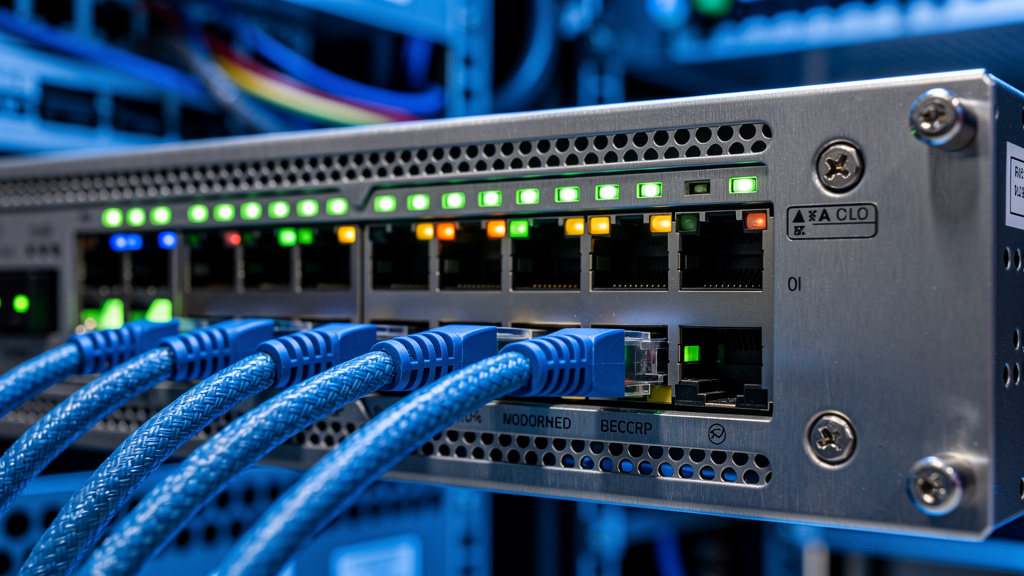
Firewalls are like security gates at the edge of a property. They watch incoming and outgoing traffic and decide which packets are allowed through based on rules. Every internet‑connected network, from a small office to a global enterprise, should have a properly configured firewall as part of its core cybersecurity tools.
There are three main types:
- Packet‑filtering firewalls check each packet on its own and allow or block it based on simple rules like source, destination, and port. They are common in small setups and as part of routers.
- Stateful firewalls go further by tracking the state of each connection, which helps them block unexpected traffic that does not match an existing session.
- Application‑layer firewalls look deeper into the content of the traffic, understand protocols such as HTTP or DNS, and can block risky applications or non‑standard port use.
For smaller organizations, a good stateful firewall with clear rules is usually enough to start. Larger environments with many segments and internet‑facing apps often use application firewalls and web application firewalls. In those cases, management platforms like Tufin, AlgoSec, FireMon, or similar tools help track and analyze rules across many devices. At VibeAutomateAI, our network security guidance focuses on designing layered perimeters, combining firewalls with segmentation and AI‑driven traffic analysis. We also stress regular rule audits to remove old rules, close unused ports, and reduce configuration drift as the network changes.
Antivirus And Anti-Malware Tools
Malware remains one of the most common ways attackers gain a foothold. Antivirus and anti‑malware tools are the guard dogs on each device, watching files and processes for signs of attack. Antivirus started out focused mainly on viruses, but modern anti‑malware covers a wider set of threats, including ransomware, Trojans, spyware, and more.
These tools use three main detection methods:
- Signature‑based detection compares files to a database of known bad patterns. It works well for older, common threats but can miss new variants.
- Behavior‑based detection watches what a program does, looking for actions such as mass file changes, suspicious network calls, or attempts to disable security tools.
- Sandboxing runs suspicious files in an isolated space to see if they act in harmful ways before they are allowed to run on the main system.
Modern “next‑gen” antivirus products mix these methods and add machine learning and cloud analysis. Well‑known packages like Norton 360, Bitdefender, Kaspersky, and McAfee all offer multi‑layer endpoint protection. The exact choice matters less than good deployment and consistent updates. At VibeAutomateAI, we help teams build endpoint protection into a broader workload security plan, including BYOD policies, server protection, and mobile devices. We also push for automatic updates for both signatures and engine versions, so protection stays current without constant manual work.
Network Monitoring And Analysis Tools

“You cannot defend what you cannot see.” — common security maxim
We often repeat that line because network monitoring gives exactly that visibility. These cybersecurity tools show which devices are on the network, how data flows between them, and where unusual traffic might signal a problem. They are just as valuable for keeping systems running smoothly as they are for stopping attacks.
Continuous monitoring helps security and operations teams spot issues early. Spikes in traffic may show a DDoS attempt or a misconfigured app. Strange connections from unexpected countries can warn of a compromise. When there is an incident, logs and network data give the evidence needed to investigate and respond quickly.
At VibeAutomateAI, we put a lot of focus on real‑time traffic analysis using AI, leveraging data analytics to enhance threat detection capabilities and reduce response times. Traditional monitoring tools generate huge numbers of logs and alerts. Our guidance centers on using AI models to highlight patterns that matter and cut down noise. We also help map which monitoring data feeds into which alerts, people, and playbooks, so information leads to action, not just dashboards.
Network Security Monitoring Systems
Network security monitoring systems collect and analyze data from across your network. They discover devices, measure traffic flow, and watch for signs that something is off. With a clear view, teams can fix performance problems and respond to threats before they spread.
Several standard protocols support this work:
- SNMP lets monitoring tools poll devices like switches and routers to track their status.
- ICMP supports basic checks such as ping, which can show if devices are reachable or if there are routing problems.
- Cisco Discovery Protocol helps Cisco devices share information about themselves, which lets tools map how the network is wired.
Popular monitoring tools include Nagios for broad infrastructure checks, Splunk for deep log analysis and search, and OSSEC for host‑based monitoring. Each has strengths depending on how much data you need to process and how much customization your team can manage. In our VibeAutomateAI frameworks, we show how to feed this monitoring data into AI‑powered behavioral analysis. We encourage teams to first establish a baseline of normal traffic volume, ports, and flows, then alert when patterns break from that baseline instead of relying only on static thresholds.
Packet Sniffers And Protocol Analyzers
Packet sniffers give a microscopic view of what is actually moving over the wire. They capture raw network packets so administrators and security analysts can inspect headers and payloads in fine detail. While this level of detail is not needed every day, it is extremely helpful for deep troubleshooting and forensic work during incidents.
There are two main ways to use these tools:
- Capture live traffic, for example when diagnosing an ongoing problem.
- Record packets to a file for later analysis, useful when replaying events during incident reviews.
Tools like Wireshark provide a graphical interface where you can filter, follow streams, and decode hundreds of protocols. Command‑line programs like tcpdump are perfect for quick captures on servers or network devices with no graphical environment.
Legitimate uses of packet sniffers include debugging failing applications, checking that encryption is in place, verifying that sensitive data is not sent in clear text, and investigating suspected attacks. Because they can see all traffic on a segment, it is important to use them only with proper authorization and with privacy in mind. Packet captures complement higher‑level monitoring by answering the “why” behind alerts. At VibeAutomateAI, we often recommend packet capture during incident reviews so teams can match alerts from monitoring systems with concrete packet‑level evidence and learn how attacks actually looked on the wire.
Intrusion Detection And Prevention Systems
Firewalls and endpoint tools block many threats at the edge, but some attacks still slip through or start from inside the network. Intrusion Detection and Prevention Systems (IDPS) watch for those threats by inspecting network and host activity. We think of them as the second line of defense once perimeter controls are passed or bypassed.
Intrusion Detection Systems (IDS) monitor traffic or host events and send alerts when patterns match known attacks or suspicious behavior. Intrusion Prevention Systems (IPS) go further, actively blocking or dropping the malicious traffic in real time. IDPS tools work best when they complement, rather than replace, firewalls. For example, a firewall might allow web traffic to a server, while the IDPS checks that traffic for exploits.
NIST defines several categories of IDPS based on where and how they monitor. Using this classification helps teams plan coverage across network segments, wireless, and hosts. At VibeAutomateAI, we tie IDPS deployment into our automated threat detection guidance. We use AI models to analyze IDPS alerts, logs, and network behavior together, which helps cut false positives and focus response playbooks on the threats that matter most.
Understanding IDPS Classifications
NIST outlines four main types of IDPS, each watching a different part of the environment:
- Network‑based IDPS (NIDPS) monitors traffic on specific segments, often via span ports or taps. These systems analyze protocols and payloads to spot known attack signatures or abnormal use of services. They are widely used near the perimeter and in key internal segments.
- Wireless IDPS (WIDPS) focuses on wireless networks. These tools look at wireless frames, rogue access points, and devices trying to connect in risky ways. They help detect attacks like evil twin hotspots or unauthorized hotspots inside an office.
- Network Behavior Analysis (NBA) tools take a broader view, measuring flows and patterns across the network to flag unusual spikes, scanning behavior, or patterns that match DDoS activity and certain malware.
- Host‑based IDPS (HIDPS) lives on individual servers or endpoints. It watches processes, logs, file changes, and system calls on that single host. This type is especially valuable for high‑value servers and for detecting attacks that may not show up clearly in network traffic.
Most medium and large organizations use a mix of these types for better coverage. In our VibeAutomateAI frameworks, we help teams choose which types to deploy first based on where their most important systems and data live.
Leading IDPS Tools
Several IDPS tools have become common building blocks in many security stacks. Snort is a well‑known open‑source tool that can act as a packet sniffer, logger, or full network IDPS. It uses a flexible rule language and benefits from a strong community that publishes and updates rules for new threats. This makes it a good fit for teams that want control and customization.
Security Onion is a Linux distribution that packages Snort, Zeek, and other tools into a ready‑to‑use platform for enterprise security monitoring and intrusion detection. It provides dashboards, sensors, and management tools to help teams stand up a full monitoring stack faster. SolarWinds Security Event Manager focuses on collecting and analyzing logs from many devices and apps, then automating responses based on set rules.
On the wireless side, Kismet is widely used to detect and analyze wireless networks, identify rogue access points, and support wireless intrusion detection. Zeek (formerly Bro) is another powerful open‑source framework for deep network security monitoring. It turns raw traffic into rich logs that are ideal for threat hunting and for feeding into SIEM and analytics platforms. At VibeAutomateAI, we help organizations pick from these tools based on size, skill level, and budget, then design IDPS rules and response playbooks so alerts trigger clear, repeatable actions.
Vulnerability Assessment And Management Tools

Most successful attacks take advantage of known problems that could have been fixed. That is why vulnerability management is one of the most important proactive uses of cybersecurity tools. The idea is simple: find weaknesses before attackers do, fix them as fast as is practical, and track the risk that remains.
Vulnerability assessment starts with scanning systems, networks, and apps for missing patches, misconfigurations, and known Common Vulnerabilities and Exposures (CVEs). Management adds the processes around that: how often to scan, how to score risk, who owns each fix, and how to verify that changes worked. Many breaches trace back to servers that were missing patches for months or web apps with well‑known flaws.
At VibeAutomateAI, we use AI‑assisted vulnerability management models to help teams rank findings by both technical severity and business impact. A medium‑severity flaw on a key payment server might deserve higher priority than a high‑severity flaw on a lab system. We also guide teams on patch management, including how to track assets, schedule updates, and isolate legacy systems that cannot be patched easily.
Automated Vulnerability Scanners
Automated scanners are the workhorses of vulnerability assessment. They connect to devices, networks, and applications, then compare what they find against large databases of known issues. The best scanners cover many thousands of CVEs and provide clear guidance on how to fix each finding.
Nessus Professional is widely seen as a standard in this space, scanning for more than fifty thousand known vulnerabilities with a strong focus on reducing false positives. Acunetix is popular for web application scanning, with advanced crawling that reaches into dynamic pages and authenticated areas. Burp Suite offers a full set of tools for web app testing, from scanning to manual testing and integration with bug tracking tools like Jira.
GFI Languard scans both networks and web applications and can also apply patches across many systems, which helps close the loop between finding and fixing. Tripwire IP360 focuses on large environments and asset discovery, finding systems that other tools might miss. Open‑source tools like Nikto support detailed web server checks, while SQLMap automates testing for SQL injection risks in web apps. In our VibeAutomateAI guidance, we suggest running different scanners on a regular schedule, grouping findings by severity and exploitability, and feeding results into clear remediation workflows. We also stress prioritizing items that have active exploits in the wild or that affect systems holding sensitive data.
Penetration Testing Tools And Methodologies
Automated scanners are powerful, but they cannot think creatively like an attacker. That is where penetration testing, or ethical hacking, comes in. Pen tests simulate real attacks to show how vulnerabilities might chain together, what an attacker can actually reach, and how far they can move inside the network.
A standard pen test usually follows these phases:
- Reconnaissance – gather public and technical information about the target.
- Scanning – map open ports, services, and possible entry points.
- Gaining access – use this information to break into systems.
- Maintaining access – show how an attacker might stay inside to steal more data.
- Covering tracks – hide evidence of the breach.
- Pivoting – move from one compromised system to others deeper in the environment.
Common tools include the Metasploit Framework for building and launching exploits, the Kali Linux distribution with hundreds of security tools pre‑installed, and platforms like Netsparker or Intruder for web app testing. We advise running pen tests after major changes, before critical launches, and at least annually. VibeAutomateAI’s application security guidance includes recommendations for when to use outside specialists and how to turn pen test reports into clear remediation plans with owners, timelines, and retests.
Data Protection And Encryption Tools

Even with strong firewalls and monitoring, some attacks will succeed. That is why we treat data protection as a last, vital layer. If an attacker reaches sensitive data but finds it encrypted and access tightly controlled, the damage is much lower. Many privacy and security laws such as GDPR and HIPAA also expect strong data protection practices, including encryption.
Encryption and access controls work together. Encryption makes stolen files unreadable without keys, while good authentication and authorization decide who can see which data in the first place. Password management and multi‑factor authentication (MFA) strengthen those identity checks. Together, these cybersecurity tools protect both data at rest and data in transit.
At VibeAutomateAI, our data protection frameworks cover how to classify data, decide which types need encryption, and choose tools for cloud, on‑premises, and hybrid environments. We also focus on key management, because losing control of keys can undo all the benefits of encryption. Finally, we always include backup protection in the data layer so that ransomware attacks cannot destroy both production and backup copies.
Encryption Technologies And Tools
Encryption turns readable information into scrambled text that only someone with the right key can read. We think about two main states: data at rest (stored on disks, backups, and devices) and data in transit (moving across networks, between apps, or to cloud services). Strong programs protect both.
Several algorithms are common:
- AES is the current standard for protecting sensitive data and is used widely by both government and private firms.
- RSA supports secure key exchange and encryption for data in transit, especially in protocols like TLS.
- Triple DES is older but still seen in some systems.
- Twofish is another respected algorithm that offers strong security with good performance.
Practical tools wrap these algorithms in easy‑to‑use packages. AxCrypt helps users encrypt individual files with strong keys. VeraCrypt supports full‑disk and volume encryption for laptops and servers. NordLocker makes it easier to protect files stored in the cloud. Tor uses layered encryption to anonymize web traffic as it passes through volunteer‑run nodes. At VibeAutomateAI, we help decide when to apply file‑level encryption, disk encryption, or transport encryption like HTTPS or VPNs. We always recommend encrypting backups, both on‑site and off‑site, so that ransomware cannot hold recovery data hostage.
Password Security And Auditing Tools
Weak passwords remain one of the easiest entry points for attackers. Reused or simple passwords make it easy for credential stuffing attacks and brute‑force tools to succeed. Good password security combines strong password choices, secure storage, and extra factors beyond just a password.
Password auditing tools such as John the Ripper and Hashcat let administrators test how easy stored password hashes are to crack. Used responsibly, they highlight which accounts need better passwords or extra controls. Password managers like KeePass store credentials in an encrypted database and can generate long, random passwords that humans would never remember on their own.
Multi‑Factor Authentication adds a second step, such as a code on a phone or a hardware key, which blocks many attacks even if a password is stolen. At VibeAutomateAI, our Identity and Access Management guidance strongly recommends MFA for all admin and cloud accounts as a minimum. We also suggest policies that favor long passphrases, avoid forced frequent rotation that leads to weak patterns, and forbid password reuse across important services.
Comprehensive Security Platforms And Managed Services
As organizations add more cybersecurity tools, a new problem appears: managing them all. Different tools create separate dashboards, alerts, and policies. If they do not share data well, teams can miss patterns that cross systems, and they waste time switching screens instead of responding to threats.
Unified security platforms and managed services aim to simplify this. Unified platforms bring several functions together, like endpoint protection, email filtering, and log analysis, under one interface. Managed services, such as Managed Detection and Response (MDR), add expert teams who watch alerts around the clock and respond on behalf of the organization.
The trade‑off is control versus simplicity. Some teams want to pick each tool themselves and tune every rule. Others would rather have fewer vendors and more automation, even if that means less fine‑grained control. At VibeAutomateAI, we help leaders weigh these options based on internal skills, budget, and regulatory needs, then design architectures that avoid tool sprawl while still covering key risks.
Unified Security Platforms
Unified security platforms combine several protective features into a single product or tightly linked set of products. The main benefit is a single view of security events, with shared threat intelligence across firewalls, endpoints, and applications. This reduces the chance that one tool has information that never reaches others.
SiteLock, for example, focuses on website protection. It scans sites for malware, removes infections, manages vulnerabilities, and includes a web application firewall to block attacks at the edge. Heimdal Security offers a platform that covers endpoint protection, DNS filtering, access control, and email security, all feeding into shared analytics. SolarWinds Security Event Manager centralizes log collection, correlates events, and triggers automated responses based on rules and patterns.
Choosing between unified platforms and separate tools depends on organization size, skills, and needs. Smaller teams often benefit from the simpler management of a unified platform. Larger teams may mix a core platform with extra tools for specialized tasks. VibeAutomateAI’s frameworks help map current and planned tools into an integrated architecture, so alerts and data flow where they should and controls support, rather than conflict with, each other.
Specialized Security Tools
Some risks need more targeted tools. Insider threats, personal device protection, and identity theft all call for specialized security products that focus deeply on those problems. Used wisely, they add important coverage without creating overlap.
Teramind is a well‑known tool for employee monitoring and data loss prevention. It tracks user actions, flags risky behavior, and applies rules to stop data from leaving in unsafe ways. User behavior analytics in such platforms can reveal unusual actions from insiders or compromised accounts, such as unexpected file transfers or off‑hours access to sensitive systems.
For endpoint protection outside large corporate stacks, tools like Bitdefender Total Security and TotalAV provide multi‑layer protection with real‑time scanning, firewall features, and helpful extras such as password storage. LifeLock focuses on identity theft protection, watching for signs that personal information is being misused and helping restore identity after a breach. In our work at VibeAutomateAI, we explain when these tools add new value versus when they duplicate features already present in unified platforms. We also stress setting clear data loss prevention policies and communicating monitoring practices to staff before rolling out employee monitoring tools.
Free And Open-Source Security Resources
One common myth we hear is that strong cybersecurity always needs huge budgets. While money does help, there are many powerful free and open‑source cybersecurity tools that match or beat commercial options. Government agencies also offer free services, especially aimed at smaller and under‑resourced organizations.
The key difference between free and commercial tools is not only cost but also support and ease of use. Open‑source tools often require more technical skill to deploy and tune, but they offer great flexibility and no license fees. Government resources provide expert support, but they may not cover every advanced use case. Many of our VibeAutomateAI clients succeed with a mix of free, open‑source, and commercial tools.
Our mission is to make security knowledge accessible, so we often recommend starting with free options to build a baseline. As needs grow, organizations can then add commercial tools where they truly provide extra value, such as strong support, compliance features, or easier management at scale.
CISA Cybersecurity Services And Resources
The Cybersecurity and Infrastructure Security Agency (CISA) is a key partner for U.S. organizations. Its mission is to help protect critical infrastructure and government networks, but many of its services are open to a wide range of public and private entities. For smaller organizations in particular, CISA offers expert guidance at no cost.
CISA encourages three main starting steps:
- Connect with a regional Cybersecurity Advisor (CSA) who can explain local threats and available services.
- Enroll in Cyber Hygiene services, which scan internet‑facing systems for weaknesses and known vulnerabilities, then provide reports.
- Use the Cybersecurity Performance Goals (CPGs), a set of high‑impact practices that help prioritize which controls to put in place first.
CISA also maintains a database of no‑cost cybersecurity tools and services from both public and private sources. You can filter by readiness level, such as foundational, intermediate, or advanced, and by the specific CPGs you aim to meet. At VibeAutomateAI, we often recommend that organizations start with these CISA resources, then use our frameworks to decide where commercial tools or extra automation are needed. A practical first action is to reach out to your regional CSA and schedule an introductory discussion.
Open-Source Security Tools
Open‑source tools play a major role in professional security work. They are built and improved by communities of practitioners who use them daily in real organizations. Many enterprises rely on them in production environments because they are powerful, flexible, and transparent.
Snort is a leading open‑source IDPS that uses rules to detect a wide range of network attacks. Wireshark is the most popular packet analyzer in the world, offering deep inspection of hundreds of protocols and both live and offline analysis. Kali Linux is a full operating system distribution built for penetration testing, with more than six hundred tools available out of the box.
Security Onion combines several open‑source tools into a ready‑to‑deploy monitoring platform, while Zeek provides rich network security logs for analysis and hunting. The trade‑off with open‑source is that you need enough technical skill to install, tune, and maintain these tools, and support usually comes from community forums or paid third‑party support contracts. VibeAutomateAI helps organizations decide where open‑source tools fit best, and how to combine them with commercial platforms when needed.
The Human Element In Cybersecurity
Technology alone cannot keep an organization safe. Many studies show that around sixty percent of breaches involve a human factor, such as clicking a phishing link, misconfiguring a system, or sharing data in unsafe ways. Employees can either be the weakest point or a powerful line of defense, depending on training, culture, and clear processes.
We see security as a people‑centered practice. Tools watch, block, and alert, but people approve payments, deploy systems, and respond to incidents. If staff are rushed, confused, or scared to speak up, mistakes slip through. When they are informed, supported, and encouraged to ask questions, they catch many threats before technical tools even notice.
At VibeAutomateAI we put a lot of effort into AI‑powered learning frameworks that make security training frequent, short, and relevant. We automate enrollments, reminders, and tracking so that awareness training becomes part of regular work, not an occasional checkbox. We also connect training with real monitoring, so employees see how their actions help detect and stop attacks.
“Amateurs hack systems, professionals hack people.” — often attributed to Bruce Schneier
Security Awareness And Training Programs

Social engineering is often the easiest and cheapest attack method for criminals. It is simpler to trick a person into sharing a password or changing a payment account than to break a strong firewall. That is why regular security awareness training is so important.
Our approach at VibeAutomateAI uses automation to keep training steady without extra burden on managers. New hires are enrolled automatically, sessions are scheduled at regular intervals, and completion is tracked. We recommend quarterly training courses, monthly micro‑lessons, and ongoing phishing simulations that mirror current attack styles.
Good programs make it clear that security is everyone’s job, not only the IT team’s. We measure progress by watching click rates on simulated phishing, how often staff report suspicious messages, and how quickly issues are escalated. We also adapt content to different roles, such as leaders, finance staff, and general employees, so examples match the risks each group faces daily.
Technical Skills For Security Professionals
Not every role in security requires deep coding skills, but technical knowledge does help. It lets professionals understand how attacks work under the hood, adjust tools, and build small automations that save time. For those who want to advance in the field, programming and scripting can open more doors.
Languages such as C and C++ help in understanding how software interacts with memory and hardware, which matters for low‑level exploits. Python is widely used for automation, quick analysis scripts, and building custom security tools. JavaScript and PHP are key for web application security because so many attacks target browser and server code. SQL knowledge is vital for spotting and preventing database injection attacks.
Certifications can also support a security career. CompTIA Security+ offers a broad introduction, while CISSP and Certified Ethical Hacker (CEH) address more advanced topics. At VibeAutomateAI, we focus on helping both technical and non‑technical leaders see how these skills connect to business risk, and we encourage continuous learning through labs, courses, and hands‑on practice.
Implementing Your Cybersecurity Tool Strategy
After reviewing so many cybersecurity tools, the natural question is where to start and how to choose. Buying products at random or copying another company’s stack rarely works well. Instead, we recommend a structured approach that starts with risk and business needs, then maps those to specific controls and tools.
A simple starting point looks like this:
- Perform a basic risk assessment. Identify your most important assets, such as customer data, financial systems, or operational technology. Think through what could go wrong, who might attack or make mistakes, and what impact that would have.
- Review current controls. Check whether you have firewalls, endpoint protection, backups, and MFA in place, and whether they are well managed and updated.
- Plan improvements. Build a roadmap to add or improve tools, beginning with foundational controls before moving to advanced analytics and automation.
At VibeAutomateAI, we call this a contextual approach: we adapt to each organization’s size, sector, and risk appetite rather than pushing a one‑size‑fits‑all stack.
Integration is another key factor. Too many separate tools can lead to alert overload and missed patterns. We advise selecting tools that can share logs and alerts, then using SIEM or AI‑driven analytics to tie them together. Security must also be treated as an ongoing practice, not a one‑year project. Regular reviews, tuning, and training keep defenses in line with new systems and threats.
Building Your Multi-Layered Defense Strategy
A multi‑layered defense relies on several types of controls working together. We group them into physical safeguards, technical controls, and administrative policies. Each layer assumes the others might fail at some point, so it tries to catch what slips through.
Perimeter tools like firewalls and web application firewalls protect the network edge. Network monitoring and IDPS watch internal traffic. Endpoint tools defend user devices and servers. Data protection and identity controls, including encryption and MFA, protect the information itself and who can access it. Modern models such as Zero Trust and Secure Access Service Edge (SASE) add structure by assuming that no network segment is fully trusted by default.
VibeAutomateAI’s holistic frameworks map all these layers onto the actual systems and data in your environment. We help you prioritize investments based on where attacks are most likely and which systems would hurt the most if breached. We also watch for gaps, such as strong perimeter controls but weak internal monitoring, or great endpoint tools but no data encryption. Our general advice is to get foundational layers in place first, then add advanced analytics and automation on top.
Measuring Security Effectiveness
Executives and boards need to understand whether security spending is paying off. That means security teams must measure their work in clear, business‑friendly terms. Metrics and key performance indicators (KPIs) help track progress and guide improvement.
Useful measures include time to detect incidents, time to respond and contain them, and the rate of false positives from alerts. Vulnerability metrics such as average remediation time and the number of high‑severity findings left open beyond a set number of days are also important. We like to separate leading indicators, such as training completion rates or patch coverage, from lagging indicators, such as actual incidents or confirmed breaches.
VibeAutomateAI focuses on measurable risk reduction. We help teams baseline their current performance before they roll out new tools, then track how metrics change over time. This makes it easier to justify investments and adjust staffing. A practical step is to set up monthly or quarterly security review meetings with leadership, where a simple, stable set of metrics is shared and discussed in plain language.
“Security is a process, not a product.” — Bruce Schneier
Conclusion
Cybersecurity can feel overwhelming when viewed as a long list of products and threats. When we step back and see how each type of tool fits into a layered defense, the picture becomes clearer. Firewalls, antivirus, monitoring tools, IDPS, vulnerability scanners, encryption, identity controls, and training each address different parts of the same problem.
Effective security needs the right mix of tools, skilled people, and repeatable processes. It is not a destination where the work ends, but an ongoing practice of watching, adjusting, and learning from both incidents and near‑misses. The threat environment will keep changing, and so must defenses, but that does not mean constant chaos. With a clear strategy and regular reviews, security becomes a steady part of running the business.
At VibeAutomateAI, our role is to bridge the gap between complex technology and real‑world operations. We bring AI‑driven analysis, practical frameworks, and focused guidance so organizations can choose and run cybersecurity tools with confidence. The best next move is simple: confirm your foundational controls, make a short list of top risks, and decide which one to improve first. From there, build each layer step by step, measure progress, and refine. With informed choices and a structured plan, any organization can face cyber risks with far more confidence.
FAQs
Question: What Cybersecurity Tools Should A Small Business Start With?
For most small businesses, the first step is to deploy a well‑configured firewall and reliable antivirus or anti‑malware on every device. A password manager plus Multi‑Factor Authentication for email, cloud apps, and admin accounts adds strong protection against credential theft. CISA Cyber Hygiene services are a great no‑cost way to scan for external weaknesses. We also suggest basic security awareness training so staff can spot phishing attempts. At VibeAutomateAI, we guide small businesses through these priorities without requiring a large budget.
Question: Are Free Or Open-Source Cybersecurity Tools Effective Enough For Business Use?
Yes, many open‑source cybersecurity tools are used every day in large enterprises and by professional security teams. Tools like Snort, Wireshark, and Kali Linux are respected industry standards. The trade‑off is that they usually require more technical skill to deploy and tune, and formal support may be limited. Open‑source works best when you have or can access that expertise, while commercial products may be worth the cost for easier setup and vendor support. Some organizations combine both, using open‑source tools with commercial support contracts.
Question: How Do I Know Which IDPS Type Is Right For My Organization?
Most organizations benefit from using more than one IDPS type for better coverage. Network‑based IDPS is usually the first choice, because it monitors traffic between key systems and the internet. Host‑based IDPS is important for critical servers and high‑value endpoints where local activity matters. Network Behavior Analysis helps when you are worried about DDoS attacks or strange traffic patterns. At VibeAutomateAI, we use structured frameworks to match IDPS choices to your systems, data, and risk profile, instead of guessing.
Question: What’s The Difference Between Antivirus And Anti-Malware Software?
Antivirus originally focused on one class of threat, computer viruses that spread by infecting files. Anti‑malware is a broader term that covers viruses plus many other threat types such as ransomware, spyware, and Trojans. Modern products often mix these features so the line between them is less clear. When choosing tools, we suggest looking for comprehensive anti‑malware capabilities, sometimes called next‑generation antivirus, rather than products that only target classic viruses. The marketing label matters less than the actual coverage.
Question: How Often Should We Run Vulnerability Scans?
For most organizations, monthly vulnerability scans are a reasonable starting point. Higher‑risk environments, such as those handling payment data or health records, may need weekly or even near‑continuous scanning. It is also important to scan after major changes, like new servers, large software updates, or app launches. VibeAutomateAI’s AI‑assisted vulnerability management guidance focuses on risk‑based prioritization, so the most dangerous findings are fixed first. Scans only create value when results feed into timely remediation, with clear owners and deadlines.
Question: Should We Use A Unified Security Platform Or Best-Of-Breed Point Tools?
Unified platforms usually provide easier integration and a single view of alerts, which can be a big help for small teams. Best‑of‑breed tools may offer deeper features in each area but can be harder to connect and manage. Your choice depends on team size, skills, compliance needs, and existing tools. Many organizations choose a hybrid model, using a central platform for core functions and adding specialized tools only where needed. VibeAutomateAI helps design integrated architectures so whatever mix you choose works together instead of in silos.
Stay connected