

Best Secure Remote Access Options: Features, Tools & Setup
Introduction
The first time we watched an entire company move from office‑only work to remote in a single week, one thing became clear fast. Either they had strong secure remote access in place, or they spent the next month fixing broken VPNs, calming frustrated users, and wondering what an attacker might already see.
Remote and hybrid work are now routine. Staff connect from home routers, airport Wi‑Fi, and personal phones, while more applications sit in public clouds instead of a single data center. The old idea of a hard perimeter around a “corporate network” no longer fits, and traditional VPN‑only setups struggle.
Attackers know this. Phishing, stolen passwords, exposed VPN gateways, and misconfigured remote desktop servers have become easy entry points. That is why many teams are moving from broad network‑level access to zero trust models that verify every user, every device, and every request.
In this guide, we break down what secure remote access really means, which core technologies matter most, and how zero trust network access (ZTNA) compares with legacy VPNs. We then look at leading tool categories, walk through a step‑by‑step rollout, and share maintenance practices. Throughout, we show how VibeAutomateAI uses tested playbooks and templates to turn theory into a repeatable setup any organization can run with.
Key Takeaways
-
Secure remote access is more than a VPN. It is a framework of policies, identity controls, and connection methods that protect access to networks, applications, and data for people working from anywhere.
-
Traditional VPNs assume that once a user is “inside” the network, they can be trusted. Zero trust models flip this idea and treat every connection as untrusted until it passes strict checks for user identity, device health, and requested application.
-
Multi‑factor authentication (MFA), single sign‑on (SSO), privileged access management (PAM), and strong encryption work best together. Each covers a different risk, from stolen passwords to abuse of admin accounts.
-
When we pick remote access platforms, we look for granular access controls, session recording, context‑aware policies, wide device support, and tight integration with identity providers and SIEM tools.
-
A practical rollout follows clear phases: assessment and planning, policy and architecture design, deployment and testing, then user onboarding. Templates and checklists make this process repeatable instead of a one‑time scramble.
-
Security work does not end at go‑live. Continuous monitoring, access reviews, patching, and incident‑response drills keep remote access strong as threats and business needs change. VibeAutomateAI focuses on these daily and weekly habits, not just big project milestones.
What Is Secure Remote Access And Why It Matters
Secure remote access is the mix of technologies, policies, and controls that lets people connect safely to corporate networks, applications, and data from outside the office. It covers:
-
How users prove who they are
-
What they can reach
-
How traffic is protected in transit
-
How every action is logged and reviewed
Office‑only models assumed most staff sat on a wired LAN, with applications in the same data center and firewalls at the edge. Now employees, contractors, and partners use laptops, tablets, and phones from homes, coworking spaces, and client sites, while services run in Microsoft 365, AWS, and other SaaS platforms. The line between “inside” and “outside” has nearly disappeared.
This shift pushed secure remote access to the top of the task list for IT and security teams. Organizations need remote and hybrid work to keep staff productive, yet they must protect sensitive data and meet compliance demands.
As NIST’s Zero Trust Architecture guidance stresses, no user or device should be trusted just because it sits on an internal network.
A simple remote desktop link might let one admin connect to one machine, and a cloud storage share might expose a single folder. A proper secure access design covers identity, authorization, network paths, session monitoring, and logging across the environment so staff get what they need while attacks and accidental oversharing stay contained.
The Shift From Network-Centric To User-Application Security
For years, companies relied on a “castle and moat” style of security. Firewalls and VPN gateways formed the moat, and anything inside the walls was treated as mostly safe. That breaks down once staff connect from everywhere and applications live in several clouds.
Modern secure access, as outlined in recent research on cybersecurity risks in remote work environments, focuses on the link between a specific user, on a specific device, and a specific application:
-
Every connection is treated as potentially hostile.
-
Access is granted only after checks for identity, device health, location, and requested resource.
-
Instead of broad VPN access to a network, users get narrow, defined access at the application level.
This user‑and‑application focus sits at the heart of zero trust design.
Core Technologies Powering Secure Remote Access
No single product can give safe remote access on its own. Strong designs mix several layers so if one control fails, others still stand. Most stacks start with identity, add granular authorization, and wrap traffic in encryption with clear monitoring.
Multi-Factor Authentication (MFA)
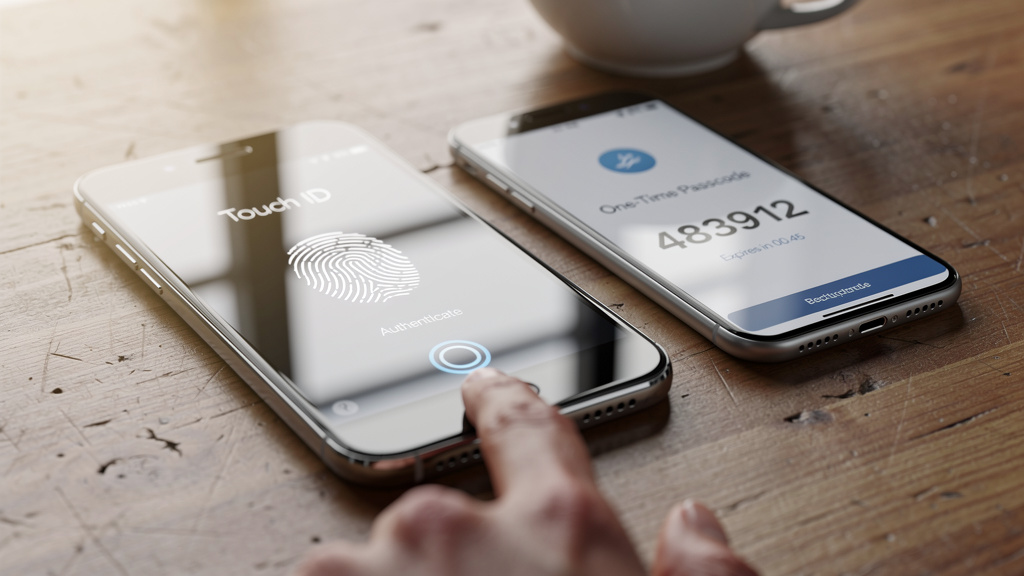
MFA asks a user to prove identity in more than one way:
-
Something you know – password or PIN
-
Something you have – phone, hardware token, smart card
-
Something you are – fingerprint or face scan
Because many breaches start with stolen or guessed passwords, MFA adds a powerful extra barrier. Even if attackers obtain a username and password, they still need a one‑time code, push approval, or physical token.
Practical tips:
-
Prefer authenticator apps or hardware keys over SMS codes, which can be intercepted.
-
Start with high‑risk groups (admins, staff with sensitive data, remote logins from untrusted networks), then expand.
-
Make MFA part of every remote access path, not just a few flagship apps.
Single Sign-On (SSO)
SSO lets a user log in once and then use many applications without re‑entering credentials. A central identity provider (IdP) — such as Azure AD or another SAML/OpenID Connect service — handles authentication and passes signed tokens to connected apps.
Benefits:
-
Centralizes control: disable one account in the IdP, and access stops across all connected services.
-
Makes consistent MFA rules possible in one place.
-
Improves user experience with one login portal for VPN replacements, SaaS tools, internal web apps, and admin portals.
When reviewing remote access platforms, we give extra weight to clean SSO integration with existing IdPs.
Privileged Access Management (PAM)
PAM focuses on accounts that can change systems rather than just use them:
-
Domain and system admins
-
Database and cloud console admins
-
Vendor and maintenance accounts
Because these accounts can read or destroy sensitive data, they require much tighter control.
Typical PAM capabilities include:
-
Credential vaults for powerful passwords and keys
-
Just‑in‑time access and time‑limited privileges
-
Approval workflows
-
Session recording and detailed audit trails
Combined with ZTNA, PAM routes admin traffic through controlled paths with full auditing, limiting both insider misuse and damage from compromised admin credentials.
Encryption And Secure Tunneling
Encryption turns readable data into ciphertext that appears as random noise without the right key. For remote access, we care most about data in transit between user devices and corporate resources.
Two key layers:
-
Network‑level tunnels – VPNs or ZTNA tunnels (often IPsec or similar) protect all traffic between points.
-
Application‑level encryption – HTTPS and other TLS‑based protocols protect data even if the underlying network is untrusted.
Modern designs often use both so sensitive data stays encrypted from client to server. We look for:
-
Current TLS versions and strong cipher suites
-
Hardware or cloud acceleration where performance matters
-
Consistent use of HTTPS for all internal and external web apps
The Evolution From VPN To Zero Trust Network Access (ZTNA)

VPNs were the main remote access method for decades. In a world where most staff sat near a data center and most applications ran on the internal network, VPNs worked well: a user connected, joined a subnet, and used resources almost as if they were in the office.
Remote work and cloud adoption changed that. VPNs still drop users into broad network zones where they can often see more systems than they truly need, and backhauling cloud traffic through a data center hurts performance. Exposed VPN endpoints also became favorite targets for attackers.
Zero trust network access (ZTNA) grew from this pain. Instead of connecting a user to a network, ZTNA connects a user to a specific application or service after checking identity, device state, and context. Every request is verified, and access is granted only when conditions match policy.
Critical Limitations Of Traditional VPN Options
Legacy VPNs create a “flat network” effect:
-
Once connected, a device often reaches many internal IP ranges.
-
If an attacker steals VPN credentials, they can connect the same way and scan for file shares, admin interfaces, or weak systems.
-
VPN gateways themselves expose services on the public internet, attracting password spraying and exploits.
From a user perspective, VPNs can feel clumsy:
-
Manual client startup and multi‑step login
-
All traffic routed through a central point, slowing access to SaaS apps
-
Complex firewall rules and IP‑based controls that are hard to scale
These trade‑offs make VPNs a poor fit as the only remote access method.
How Zero Trust Network Access (ZTNA) Redefines Security
ZTNA is built around “never trust, always verify.” Key ideas include:
-
Application and network isolation – users see only the apps they are allowed to use, not whole subnets.
-
Inside‑out connections – lightweight connectors inside the network reach out to a ZTNA service, so internal apps do not expose open ports or public IPs.
-
Application segmentation – after authentication, ZTNA grants one‑to‑one access between a user and a specific app; lateral movement becomes far harder.
-
User‑application focus – identity, device posture, and context drive decisions, while the network acts mainly as transport.
ZTNA can run as a deployment you manage yourself or as a hosted service. In both cases, VibeAutomateAI helps teams compare VPN and ZTNA across security, performance, and management, then build a migration plan that fits their size and risk profile.
Essential Features To Look For In Secure Remote Access Tools
When we help teams choose remote access platforms, we start by mapping features to real needs — regulatory duties, risk appetite, workforce size, and third‑party access, guided by Segura® documentation on privileged access management best practices. We then focus on capabilities that matter every day:
-
Granular access controls – role‑based and attribute‑based rules, time‑limited access, and clear mappings between job roles and permissions.
-
Session management and recording – live monitoring, recordings for high‑risk work, and detailed logs to support incident response and audits.
-
Context‑aware policies – checks for device health, risky locations, and unusual behavior, plus step‑up authentication or blocks when something looks off.
-
Cross‑platform support – consistent protection across Windows, macOS, Linux, iOS, and Android without a tangle of different agents.
-
Integration – clean links with IdPs such as Azure AD or Okta, SIEM platforms, endpoint management, and ticketing tools through APIs.
-
Performance and reliability – low latency, high availability, and global points of presence so remote staff do not feel slowed down by security.
-
Compliance and audit features – detailed logs, exportable reports, and options for data residency to support GDPR, HIPAA, PCI‑DSS, SOC 2, ISO 27001, and similar standards.
-
User experience – simple login flows, clear prompts, and minimal extra clicks to reduce the urge for risky workarounds.
Top Secure Remote Access Options: A Practical Comparison
No single product fits every environment, so we group remote access tools by the problems they are best at solving, from secure industrial remote access solutions for OT environments to enterprise VDI platforms for large organizations. Our role at VibeAutomateAI is to help teams see where each option shines, where it falls short, and how to combine them into a clear architecture.
As Bruce Schneier famously said, “Security is a process, not a product.” Remote access design is a prime example of that idea.
1. VibeAutomateAI’s Secure Remote Access Implementation Framework
We built VibeAutomateAI as a practical guide through secure remote access projects, not as another agent or gateway. Our framework walks teams through:
-
Assessment of current remote access paths
-
Design of policies and architectures
-
Deployment and testing playbooks
-
Ongoing operations, reviews, and tuning
We map your needs to options such as ZTNA services, PAM platforms, VDI stacks, and remote support tools. Our content includes step‑by‑step instructions for common patterns like moving from VPN to ZTNA or adding PAM for cloud admin access, and we keep guides updated as threats and tools change.
2. Enterprise VDI Platforms (Citrix Virtual Apps And Desktops)
Enterprise VDI platforms such as Citrix Virtual Apps and Desktops fit large organizations with complex application needs and heavy compliance pressure. They:
-
Centralize Windows apps and desktops in a data center or cloud
-
Keep data inside controlled environments
-
Offer strong isolation and rich management controls
They integrate well with zero trust designs but come with higher licensing and design effort. We often see them in healthcare, finance, and government environments.
3. SMB-Focused Platforms (Parallels RAS)
For small and mid‑sized businesses, full enterprise VDI can feel heavy. Parallels Remote Application Server (RAS) offers many of the same basic benefits with:
-
Simpler setup and management
-
Lower cost profiles
-
Support for publishing Windows apps and desktops from on‑premises or cloud hosts
Some advanced features and deep integrations may be missing compared with large‑enterprise stacks, so we help teams decide which capabilities they really need.
4. Microsoft-Centric Platforms (Remote Desktop Services)
Organizations already invested in Windows Server often look first at Remote Desktop Services (RDS). It:
-
Delivers published desktops and RemoteApp
-
Integrates tightly with Active Directory and other Microsoft tools
-
Can be cost‑efficient when licenses and skills are already in place
On its own, RDS may lack fine‑grained security controls, rich MFA flows, or detailed session recording. In those cases, we often pair it with third‑party security layers or plan a gradual shift of certain workloads to ZTNA or VDI.
5. IT Support And Remote Assistance (TeamViewer)
Remote support tools such as TeamViewer serve help desks and field support teams. They:
-
Connect quickly to end‑user devices across platforms
-
Provide features like file transfer, clipboard sharing, and unattended access
-
Use strong encryption for ad‑hoc troubleshooting and device management
They work best as specialist tools inside a wider remote access design, not as replacements for ZTNA or VDI.
6. Application Publishing For ISVs (GO-Global)
Independent software vendors that host Windows applications for customers often need a way to present apps without a full VDI stack. GO‑Global focuses on this use case, offering:
-
Lightweight application publishing
-
Good performance by sending only the user interface over the network
-
Straightforward management for focused app delivery
It is well suited to SaaS‑style delivery of traditional Windows apps, especially when combined with strong authentication and encrypted channels.
Step-By-Step Implementation Guide For Secure Remote Access

Even the best tools fail if they are dropped into a messy environment without a plan. We see smoother projects when teams follow a phased approach. VibeAutomateAI’s templates help at each stage.
Phase 1: Assessment And Planning
Focus on:
-
Listing all current remote access methods, both official and unofficial (VPNs, RDP servers, remote support tools, SaaS admin portals).
-
Mapping user groups (employees, contractors, vendors, admins) to the applications and data they need.
-
Reviewing current security posture: exposed services, missing MFA, shared admin accounts, logging gaps.
-
Matching findings against compliance duties (HIPAA, PCI‑DSS, SOC 2, etc.) and building a prioritized roadmap.
Phase 2: Policy Development And Architecture Design
Next, define how access should work:
-
Write policies describing who may reach which apps, from which device types, and under what conditions.
-
Plan network segmentation and micro‑segmentation to separate sensitive systems.
-
Choose authentication patterns: accepted MFA methods, SSO flows, and the primary IdP.
-
Design privileged workflows with approvals, time limits, and monitoring.
-
Decide on the mix of on‑premises ZTNA, hosted ZTNA, VDI, and RDS.
VibeAutomateAI’s policy templates help you document how each control maps to specific risks and compliance needs.
Phase 3: Deployment And Configuration
Avoid big‑bang changes. Instead:
-
Start with a pilot: a small set of users and applications.
-
Deploy connectors, agents, or gateways following secure remote access deployment best practices, and integrate them with the IdP and MFA.
-
Test application behavior, performance, logging, and alerting end to end.
-
Gather user feedback and tune policies before expanding to more users and apps.
Keep configuration records so you can repeat setups in new environments and recover quickly from failures.
Phase 4: User Onboarding And Training
A secure design only works when people understand it:
-
Create simple guides that explain how to connect, what MFA prompts look like, and where to get help.
-
Prepare separate material for regular staff, admins, and vendors.
-
Train help desk teams early so they can handle first‑day questions.
-
Set up feedback channels (surveys, tagged tickets) and adjust user flows without weakening security.
Best Practices For Maintaining Secure Remote Access

After go‑live, the focus moves to running and improving the environment.
-
Continuous monitoring and auditing – forward logs from ZTNA, VPN, PAM, and IdPs into a SIEM; alert on failed login spikes, new device types, and strange locations.
-
Regular access reviews – at least quarterly, remove stale accounts, trim unneeded permissions, and align access with real roles.
-
Patch management – keep gateways, connectors, clients, and related servers updated; test in staging where possible.
-
User behavior analytics – look for unusual patterns in login times, devices, and access paths; respond with step‑up authentication or temporary blocks when needed.
-
Security assessments – run targeted penetration tests and vulnerability scans focused on remote access paths.
-
Incident response readiness – maintain playbooks for remote access incidents (stolen credentials, compromised admin accounts, exposed connectors) and test them with tabletop exercises.
-
Performance and capacity planning – track connection counts, latency, and error rates, and tune bandwidth and routing based on data. VibeAutomateAI’s tuning guides can help here.
Common Challenges And How To Overcome Them
Real projects rarely follow a perfect script. As highlighted in SANS research on securing remote access in OT environments, common hurdles include:
-
User resistance – new MFA steps or portals can feel like friction. Counter this with clear explanations, quick demos, and early feedback loops. Show how changes protect individual accounts as well as company data.
-
Legacy application compatibility – older apps may not support HTTPS, SSO, or modern clients. Options include wrapping them behind secure gateways, publishing through VDI, or planning replacements. VibeAutomateAI provides pattern guides for these wrap‑and‑contain approaches.
-
Performance and latency – remote users in distant regions or on weak connections may feel slowdowns. Choose platforms with global presence, tune routing, and place heavy workloads close to users where possible.
-
Budget constraints – smaller organizations often need phased projects. Prioritize high‑impact steps such as MFA everywhere and shutting down exposed RDP, then move toward ZTNA and PAM over time.
-
Complexity and skills gaps – few teams start with deep zero trust experience. Combine internal staff with targeted training, outside help when needed, and clear documentation.
-
Balancing security with productivity – too much friction breeds workarounds; too little creates risk. Context‑aware policies and risk‑based authentication tighten checks only when behavior seems unusual.
-
Vendor and third‑party access – accounts that sit outside HR processes can be overlooked. Use time‑limited access, route all vendor work through PAM with recording, and enforce strong MFA. Review vendor accounts regularly.
Frequently Asked Questions
What’s The Difference Between A VPN And ZTNA?
A VPN creates an encrypted tunnel that connects a user’s device to a company network, often giving broad reach across internal systems. Trust is largely based on being “inside” that network, which can allow lateral movement if an account is compromised.
ZTNA connects a user only to specific applications after checking identity, device health, and context. Internal apps are hidden from the public internet, and users receive one‑to‑one access instead of wide network reach. Many organizations keep VPNs for a few legacy or low‑risk cases but move core access to ZTNA.
How Much Does Implementing Secure Remote Access Tools Cost?
Costs vary widely by platform type, number of users, and regions supported. Typical cost buckets include:
-
Licenses or subscriptions
-
Infrastructure (gateways, connectors, cloud capacity)
-
Professional services or internal staff time for design and rollout
-
Ongoing management, monitoring, and support
On‑premises builds may require more up‑front spending, while hosted services spread costs into monthly fees. At VibeAutomateAI, we look at total cost of ownership, including operations and security monitoring, not just license price.
Can Secure Remote Access Tools Integrate With Our Existing IT Infrastructure?
In most cases, yes. Modern platforms are built to tie into:
-
Existing IdPs (Azure AD, Okta, on‑premises AD) via SAML or OpenID Connect
-
SIEM tools through syslog or APIs
-
Endpoint management and MDM systems
-
Ticketing and automation tools
For migrations from older VPN or RDS setups, we often plan staged rollouts where old and new methods run in parallel for a time. Legacy systems may need secure gateways or wrappers, and VibeAutomateAI’s guides include patterns for handling those cases.
How Long Does It Take To Implement A Secure Remote Access Setup?
Timelines depend on organization size, number of applications, and how many changes are needed:
-
Small companies moving a few apps to a hosted ZTNA platform can often complete a core rollout in a few weeks.
-
Larger enterprises with many apps, multiple identity sources, and detailed policies may need several months of design, testing, and phased deployment.
Starting with a pilot group and a short list of critical apps usually speeds things up and reduces surprises later.
What Compliance Requirements Do Secure Remote Access Tools Help Meet?
Secure remote access designs support many common requirements in GDPR, HIPAA, PCI‑DSS, SOC 2, ISO 27001, and similar frameworks, including:
-
Strong access control and MFA
-
Encryption of data in transit
-
Detailed logging of admin and remote activity
-
Regular access reviews
Many platforms provide built‑in reports and log exports that map directly to audit questions. We also pay close attention to data residency options and how logs and recordings are stored, which can be important for privacy regulations.
Is Secure Remote Access Suitable For Small Businesses, Or Only For Enterprises?
Secure remote access matters just as much for small businesses, since attackers often scan the internet for weak points without caring about company size. The difference is that smaller teams need simpler and more affordable approaches.
Cloud‑based ZTNA and PAM services now bring advanced controls within reach of small organizations. We often suggest starting with:
-
MFA for all remote access
-
Closing exposed RDP and other risky services
-
Adding basic ZTNA for a few key apps
From there, small businesses can grow into more advanced controls using the practical guides we publish at VibeAutomateAI.
Conclusion
Remote and hybrid work have turned secure remote access into a core function rather than a side project. The old pattern of dropping users onto a flat network through a VPN no longer matches how we use cloud apps, mobile devices, and partner access. By shifting to zero trust models that focus on each user‑and‑application connection, organizations can reduce common attack paths while keeping staff productive from anywhere.
We have covered what secure remote access means, why identity and encryption matter, how ZTNA differs from traditional VPNs, key features to look for in platforms, major tool categories, and a four‑phase implementation plan. The same lesson appears again and again: careful planning and steady, phased work make strong remote access reachable for organizations of all sizes.
At VibeAutomateAI, we focus on turning complex security patterns into clear, repeatable guides — from ZTNA rollouts and PAM deployments to audit‑ready logging setups. A practical next step is to review your current remote access methods, list exposed services and high‑risk accounts, and compare that picture with the patterns in this article. From there, explore our detailed guides on zero trust design, privileged access, and cloud security to build a roadmap that fits your environment and keeps your remote access a step ahead of new threats.
Stay connected