

Introduction
Picking an e-commerce platform feels a bit like choosing the foundation for a building. Once it is in place, everything else rests on it. The right e-commerce platform can raise revenue, keep operations smooth, and support growth without constant firefighting. The wrong choice can lock a business into high costs, slow sites, security worries, and endless patchwork fixes.
There are more platforms than ever, each with different features, pricing, and technical tradeoffs, from enterprise solutions like commercetools to mid-market options detailed in guides such as 9 Best Ecommerce Platforms comparisons. SaaS services promise easy setup, open-source tools promise control, and headless setups promise freedom. For many teams, it is hard to tell which promises matter and which details hide extra work and cost.
In this guide, we walk through how e-commerce platforms work, how they differ, and what to look for before signing a contract or spinning up a server. We keep the language practical and close to day‑to‑day decisions. At VibeAutomateAI, we specialize in turning complex tech topics into clear, actionable steps, with a strong focus on automation, AI, and security. By the end, you will have a simple framework to match platform type, features, pricing, and performance with your business model, budget, technical skills, and growth plans.
Key Takeaways
- Match platform type to your business model before picking themes. When platform structure fits how a company sells, teams spend more time serving customers and less time fighting tools. Poor fit often shows up later as hidden work, not during the first trial.
- SaaS, open-source, and composable platforms trade control for convenience in different ways. There is no single best option, only a better fit for a specific mix of skills, budget, and risk comfort. Clear thinking here prevents expensive replatform projects later.
- Total cost of ownership (TCO) is more than subscription pricing. Hosting, apps, transaction fees, development, and security management add up over time. Comparing three‑ to five‑year cost gives a truer picture than looking only at the first invoice.
- Security, compliance, and payment handling sit at the base of every serious online store. Level 1 PCI compliance, SSL, and strong access control are table stakes, not extras. Ignoring this area invites legal issues and lost customer trust.
- Scalability matters from the start. Multi‑storefront support, international selling, and solid APIs protect a business from hitting a ceiling after early success. Thinking about peak days now saves stress when a marketing win suddenly spikes demand.
- AI and automation are shifting from “nice to have” to expected. Platforms and tools that help with content, recommendations, and workflow automation give teams back time for higher‑value work. At VibeAutomateAI, we focus on helping readers apply these tools without drowning in jargon.
- Composable and headless approaches fit enterprises with many channels and strict requirements. These designs add setup and operations work, but they let teams tune each part of the stack. For smaller teams, a simpler platform is often faster and safer, even if it feels less flexible on paper.
Understanding E-Commerce Platform Fundamentals
When we talk about e-commerce platforms, we mean full software systems that run an online store from end to end. An e-commerce platform is not just a website theme or a payment button. It is the core application that handles catalog data, pricing, carts, checkout, and the back‑office tasks that keep orders moving.
At the front, most platforms include a storefront builder that controls layout, menus, product pages, and content. Behind that, they store product information with fields for descriptions, images, options, and prices. A shopping cart and checkout flow connect these pieces so visitors can move from browsing to paid orders in a clear, safe way.
On the back end, platforms manage inventory counts, order status, shipping details, taxes, and customer records. They link with payment gateways to charge cards or wallets, and with shipping carriers to print labels and send tracking updates. Many add tools for discounts, coupons, gift cards, and reporting so owners can see what sells and where margins sit.
Modern systems reach further into marketing and analytics. They often include SEO features, email and social integrations, abandoned cart recovery, and dashboards that track revenue and behavior. Some now add AI to suggest products, write quick descriptions, or surface insights that used to need a data team. The platform becomes the nervous system that connects customers, operations, and leadership.
Because of this central role, selecting an e-commerce platform is a strategic move, not just a design choice. It affects how fast new ideas can launch, how safely data is handled, and how well the store can scale during peak events. At VibeAutomateAI, we help readers understand how these systems connect to ERPs, CRMs, marketing tools, and security controls so they can build workflows that are both productive and safe.
“If you do build a great experience, customers tell each other. Word of mouth is very powerful.”
— Jeff Bezos, founder of Amazon
Types Of E-Commerce Platforms Architecture And Hosting Models
Before comparing features or pricing tables, it helps to understand how different e-commerce platforms are built and hosted. Architecture and hosting decide who manages servers, who patches software, and how much freedom a team has to change code. Matching this structure to real technical resources is one of the most important early choices.
SaaS Hosted Or Cloud-Based Platforms

SaaS e-commerce platforms are fully hosted services where the provider runs the servers, database, and core software. With this model, a business pays a recurring fee to use the platform, while the vendor handles uptime, backups, security updates, and PCI tasks. Users log in through a browser to build their storefront and manage orders without touching infrastructure.
This model has a low barrier to entry, which is why many first‑time stores start here. Setup is usually guided, themes are easy to apply, and basic settings live in clear control panels. Costs are predictable because hosting, maintenance, and core features roll into the subscription. For teams without in‑house engineers, this keeps the focus on marketing and operations instead of patching servers.
The tradeoff is less control over deep customization. While platforms like Shopify and Wix offer apps and template code, there are limits to how much the core behavior can change. Teams also depend on the provider roadmap and release pace. Some SaaS vendors charge extra transaction fees if merchants use outside payment gateways. Modern services such as BigCommerce try to ease these tradeoffs with strong APIs and more open development tools, often called open SaaS. We see SaaS platforms as a good fit for startups, small and mid‑size businesses, and any group that values speed to market over deep technical control.
Open-Source Self-Hosted Platforms

Open-source e-commerce platforms take the opposite path. The software code is available to download and modify, and merchants choose their own hosting provider or data center. This model allows teams to change almost any part of the storefront or back end. It can be tuned for very specific business rules, design needs, or integrations.
With this freedom comes real responsibility. Someone must secure the server, apply patches, monitor performance, and handle PCI compliance if cards touch the site. Extensions from third parties need testing to avoid conflicts or security holes. When traffic grows, hosting must be scaled and tuned, sometimes with help from specialists. All of this adds ongoing cost that does not show up in a simple license price.
The total cost of ownership (TCO) for self‑hosted platforms often includes premium hosting plans, development retainers, security tools, and time from internal IT staff. For a small store, this can be heavy. For a large brand with in‑house developers and complex needs, it can be worth it. Platforms like WooCommerce, Adobe Commerce, OpenCart, and PrestaShop sit in this category. We usually see open-source as a good option for enterprises or technically strong teams that need control more than convenience.
Composable And Headless Commerce Architecture
Composable commerce describes a modular approach where an e-commerce platform is one service among many, each focused on a narrow task. These systems often follow MACH ideas, which favor microservices, strong APIs, cloud‑native services, and a headless separation between front end and back end. In headless designs, the storefront runs as its own app while the commerce engine provides data and logic through APIs.
This setup offers high flexibility. Front end teams can build web, mobile, kiosk, or app experiences that all talk to the same commerce core. Each part of the stack can be swapped or upgraded with less impact on the others. Performance can improve because the front end can be tuned or cached without dragging along parts of the admin layer.
The tradeoff is greater complexity in design, build, and daily operations. Teams need developers comfortable with APIs, integration patterns, and monitoring across many services. Projects often take longer to launch and need stronger project management. Platforms like BigCommerce, commercetools, and Shopify Plus support headless or composable designs. We see this model as best for mid‑market and enterprise brands with strong technical teams and demanding omnichannel plans.
Critical Selection Factors Aligning Platform Choice With Business Needs
Once the basic types of e-commerce platforms are clear, the next step is to match them with real business needs. Treat this like a long‑term technology decision, not a theme choice. The right fit depends on who the customers are, how complex the products are, what skills the team has, and where the business aims to be in a few years.
Business Model And Product Complexity Considerations
A B2C store that sells a few dozen consumer products has very different needs from a B2B wholesaler with complex contracts. B2C platforms can focus on attractive storefronts, simple pricing, and fast checkouts. B2B models often need features like:
- Customer‑specific catalogs
- Negotiated prices and volume tier discounts
- Restricted access areas
- Quote and purchase order flows
Not every platform offers these natively.
Product complexity also shapes platform choice:
- A fashion brand with many sizes and colors per item needs strong variant handling and clear admin tools.
- Large catalogs with tens of thousands of SKUs can stress weaker search and filtering features.
- Stores that sell digital items, subscriptions, or made‑to‑order goods introduce their own rules for delivery, billing, and production.
Some platforms have hard or soft limits around catalog size or number of options per product. At VibeAutomateAI, we often help teams map these workflows on paper before they pick tools so they can see where automation and custom rules matter most.
Budget And Total Cost Of Ownership TCO
It is easy to anchor on the monthly price listed on a sales page, but that is only one piece of the cost picture. For SaaS platforms, merchants also pay payment processing fees, possible extra transaction fees, and costs for premium themes. Many stores add apps for subscriptions, reviews, advanced search, or shipping rules, which can build a monthly stack of charges.
For self‑hosted platforms, direct license costs may be low or zero, but hosting, security tools, and developer time replace them. Security work, backups, and monitoring need real budget. Some businesses hire agencies to handle builds and maintenance, which turns into a fixed yearly spend. Studies such as Forrester research on BigCommerce show that paying more for a well‑matched platform can return value over several years through better uptime and lower reliance on custom apps.
A simple TCO view over three to five years should include:
- Base platform or license fees
- Payment processing and any extra transaction fees
- Hosting and content delivery network costs
- Paid apps, plugins, or extensions
- Development, support, and agency retainers
- Security tools, audits, and insurance
We suggest building side‑by‑side TCO estimates for each option to compare fairly.
Technical Resources And Implementation Approach
Honest assessment of technical skills may be the most important step in selecting an e-commerce platform. If a company has an internal development team with time to spare, open-source or composable setups can work well. These teams can maintain servers, integrate with other systems, and support custom features. Without this support, the workload falls on owners or marketers, who often do not have time or training for it.
Many businesses choose between:
- Building in house on a simpler platform, or
- Hiring an agency for something more complex
Both paths can work, but each needs planning for ongoing updates, new feature work, and troubleshooting. Support channels matter too. Some platforms offer strong professional services, partner networks, and active forums. Clear documentation and training resources, such as the guides we publish at VibeAutomateAI, help internal teams stay confident as they roll out new tools and automation.
“The bitterness of poor quality remains long after the sweetness of low price is forgotten.”
— Benjamin Franklin
Essential Features And Functionality Your Complete Evaluation Checklist
After a short list of e-commerce platforms is in place, it is time to compare concrete features. A feature checklist keeps important items from getting lost under glossy themes or marketing claims. While priorities differ by industry, some feature areas matter to almost every serious store.
Security Compliance And Payment Processing

Security sits at the base of any e-commerce operation. Customers share card numbers, addresses, and personal data with the store and expect care in return. At a minimum, platforms should:
- Meet Level 1 PCI DSS standards for card handling
- Provide SSL/TLS for all pages that collect data
- Offer two‑factor authentication for admin accounts
- Release regular security updates
Payment processing features decide how well the store adapts to customer habits in each region. Good platforms support major gateways such as Stripe, PayPal, and Square, along with digital wallets like Apple Pay and Google Pay. Multi‑currency support matters for international selling, and local payment methods can raise conversion in some markets.
Checkout flows should be clean and fast:
- One‑page checkout
- Guest checkout options
- Clear error handling and validation
- Support for accelerated methods like Shop Pay where relevant
For merchants serving European or California users, compliance with GDPR and CCPA data rules needs attention. At VibeAutomateAI, we often guide readers through pairing platform features with wider cybersecurity and privacy frameworks.
Marketing SEO And Customer Acquisition Tools
Traffic and conversion do not happen by accident. Platforms with solid marketing and SEO tools make it easier to attract and keep customers without huge ad budgets. Key SEO features include:
- Clean, editable URLs
- Customizable meta titles and descriptions
- Automatic 301 redirects
- XML sitemaps
- Fast page delivery, often via a content delivery network (CDN)
On the marketing side, look for:
- Email integrations and abandoned cart recovery
- Rule‑based discount engines and coupon codes
- Gift cards, loyalty programs, and customer segments
- Social commerce links for Instagram, Facebook, and TikTok
- Marketplace feeds for Amazon and Google Shopping
Newer AI features can suggest products, tune content for segments, or forecast likely buyers, with studies on How Online Retailers Use personalization showing measurable impacts on conversion rates and customer engagement. These tools fit well with the SEO and automation practices we teach at VibeAutomateAI.
Inventory Management Order Fulfillment And Operational Tools
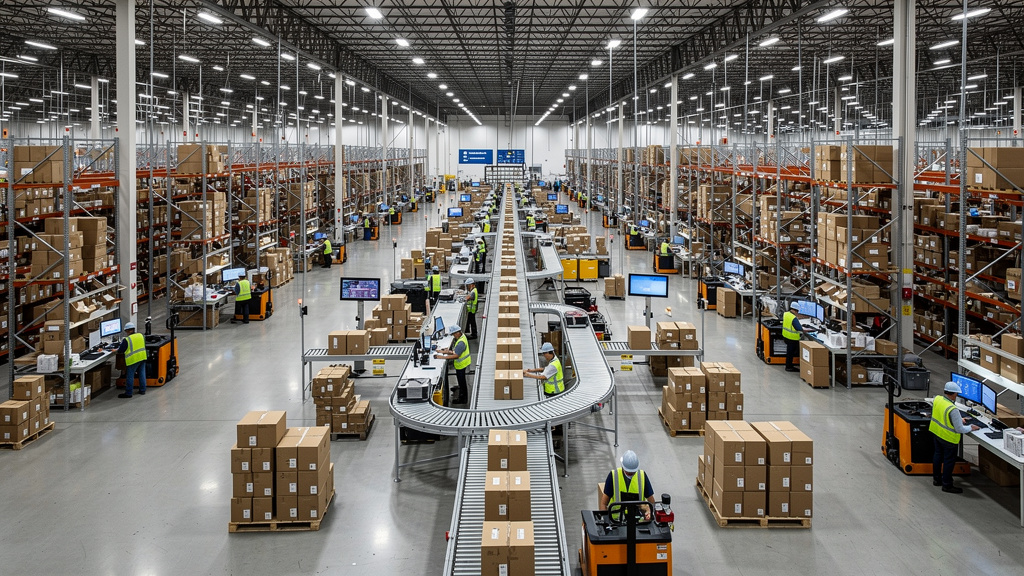
Behind the scenes, operations decide if a store feels smooth or chaotic. Platforms need clear inventory management with support for variants, bundles, and multiple locations. Low‑stock alerts and simple forecasting reports help prevent stockouts or overbuying. When products ship from several warehouses, the system should route orders in a sensible way.
Order management tools track each purchase from payment to delivery and possible return. Good systems provide:
- Status updates and notifications
- Easy refunds and partial refunds
- Integration with carriers like UPS, FedEx, USPS, and regional options
- Support for dropshipping, 3PL partners, and in‑store pickup
Many stores now mix direct shipping, dropshipping, and third‑party logistics. Some also run buy online, pick up in store (BOPIS) or local delivery. The platform should handle these models without clumsy workarounds. Reporting on sales, margins, customer behavior, and inventory performance helps leaders adjust quickly. At VibeAutomateAI, we focus on tying these tools into wider automation patterns so staff can rely on clear dashboards instead of manual spreadsheets.
Platform Comparison Leading Options For Different Business Profiles
With the groundwork set, it is easier to look at specific e-commerce platforms and see how they match different business profiles. Rather than naming a single winner, it helps to outline where each service shines and where it may create friction. This lets teams build a focused short list before they dive into trials.
Shopify The User-Friendly Market Leader For SMBs
Shopify is often the first name people hear when they start looking at e-commerce platforms, and for good reason. Its admin area is clean and easy to learn, so non‑technical users can set up products, pages, and discounts without a developer. The app marketplace holds thousands of extensions for shipping, marketing, and more, and a large theme store offers many designs.
Shopify also brings its own payment option and a strong point‑of‑sale system that links in‑person and online sales. AI tools such as Shopify Magic and Sidekick can write drafts of product descriptions or answer store questions in a chat style.
On the downside, merchants who skip Shopify Payments can pay extra transaction fees, and deeper customization needs knowledge of the Liquid template language. Native B2B and multi‑storefront features are limited unless merchants move to Shopify Plus, which starts at enterprise pricing. For many startups, small shops, and dropshippers, though, Shopify balances simplicity and power well.
BigCommerce Enterprise-Grade Features For Growing Businesses
BigCommerce is another major SaaS player, with a clear focus on growth‑oriented merchants. Unlike some rivals, it does not charge extra transaction fees based on payment gateway choice. Many features that require apps elsewhere come built in, including:
- Advanced promotions and discount rules
- Strong SEO tools
- Multi‑store management
- B2B features when using the B2B Edition
From a technical angle, BigCommerce uses an open SaaS approach with powerful APIs and support for headless builds. This lets teams connect it with content systems, custom front ends, and internal tools more freely. The platform has strong uptime records and handles high‑traffic events well when stores run big campaigns.
The tradeoff is a steeper learning curve at the start compared with the simplest platforms. Plans also come with annual sales thresholds that trigger upgrades as revenue climbs. For fast‑growing SMBs, brands with both B2C and B2B channels, and multi‑brand groups, BigCommerce can be a strong fit.
Adobe Commerce Magento Enterprise Power With Enterprise Complexity
Adobe Commerce, still often called Magento by many teams, sits firmly in the enterprise camp. It is known for deep customization options that let developers mold almost every part of the store and admin flow. It supports advanced B2B needs, complex catalogs, and multi‑store setups across regions or brands. When paired with other Adobe tools, it can tie store behavior to rich content and analytics.
The cost side is significant. License pricing alone often starts in the tens of thousands per year, and that does not include hosting, build work, or ongoing maintenance. Because stores rely on custom code, upgrades must be tested carefully so new releases do not break live features. Most companies running Adobe Commerce keep in‑house developers or long‑term agency partners. For large enterprises with high revenue and very specific demands, this can still be a smart investment.
WooCommerce And WordPress Flexibility For Content-First Businesses
WooCommerce is a plugin that turns a WordPress site into a store, and it is one of the most widely used e-commerce platforms by install count. Its appeal lies in the combination of a free core plugin, huge theme choices, and countless extensions. For content‑heavy brands that already live on WordPress, it lets them keep one system for both blog and store. SEO tools from the WordPress world carry over as well.
The other side of the coin is that WooCommerce inherits the self‑hosted nature of WordPress. Store owners must pick and pay for hosting, manage updates, and keep security tight. As more plugins are added, performance and compatibility become real concerns. Quality hosting plans can cost more than many expect, and premium extensions add to spend. With good hosting and careful setup, WooCommerce can scale, but it asks more technical care than most SaaS rivals. We usually see it fit best for existing WordPress users and content‑driven businesses that accept this extra work.
Specialized Options Square Online Wix And Squarespace
Not every business needs or wants a heavyweight e-commerce platform. For some, simpler tools focused on narrow cases make more sense.
- Square Online is built for merchants already using Square point‑of‑sale devices in stores, at events, or in restaurants. It syncs in‑person and online inventory and orders through one account. The website builder is basic but fine for menus and small catalogs, and a free plan lets merchants get started with only transaction fees. Limits show up as catalogs and design needs grow.
- Wix and Squarespace started as website builders and later added e-commerce features. They still shine for creators, small retailers, and service providers who care most about polished design and simple editing. Their drag‑and‑drop builders make visual changes easy, and hosting and security are handled by the vendor. At the same time, their commerce tools do not go as deep as dedicated e-commerce platforms. They are best suited to smaller catalogs and simpler workflows. As businesses grow into more demanding operations, many move from these platforms to something more specialized.
Conclusion
Choosing between e-commerce platforms is one of the most important technology calls a business will make. The platform sits at the center of revenue, customer experience, and daily operations, so its strengths and limits show up in real metrics. A calm, structured review beats picking the tool with the flashiest theme demo every time.
The framework we walk through here starts with platform type. SaaS, open-source, and composable setups all mix control, cost, and workload in different ways. From there, we map each option against the business model, product complexity, and growth path. Total cost of ownership over several years matters more than the first bill, and scalability plans should look at peak loads and new channels, not only current volume.
Above all, any serious e-commerce platform must bring strong security, PCI compliance, and reliable payment processing. SEO, marketing tools, and clean operational workflows are not nice‑to‑have extras; they are central to profit and customer trust. What works for a small creative studio may be a poor fit for an enterprise wholesaler, so context matters more than logos.
AI features, automation, and composable patterns are becoming important ways to stand out and stay efficient. They help teams move faster without burning out, as long as they rest on a sound platform base. At VibeAutomateAI, we are committed to guiding readers through these choices with clear, hands‑on advice. The next step is simple: list current and future needs, map them against this framework, and use that short list to compare platforms with a sharper eye. Our guides on AI, automation, and cybersecurity are ready to support the move from planning to action.
FAQs
Question 1 What Is The Difference Between A SaaS Platform And An Open-Source Platform
A SaaS e-commerce platform is a hosted service where the provider runs the servers, software, and security for a recurring fee. Users log in, configure their store, and rely on the vendor for updates, uptime, and PCI compliance.
An open-source platform is software that merchants install on their own hosting, usually with code access for deep changes. In that case, the merchant or their partners manage security, performance, and upgrades. We usually recommend SaaS for most businesses unless they have a development team and clear needs that demand extra control.
Question 2 How Much Does It Really Cost To Run An E-Commerce Store
Real costs for e-commerce platforms include more than the advertised plan level. Many SMB stores pay roughly $30–$400 per month for the base platform, plus payment processing around a few percent per transaction. On top of that come:
- Domain registration and SSL certificates each year
- One‑time or recurring costs for themes
- Monthly app or extension charges
Self‑hosted stores add hosting fees that can range from modest shared plans up to several hundred dollars for managed services. Many merchants also budget for marketing tools, shipping software, and occasional developer or agency work.
Question 3 Which Platform Is Best For B2B E-Commerce
B2B selling needs features that consumer‑focused platforms often do not include. These stores rely on:
- Customer‑specific pricing and custom catalogs
- Volume‑based ordering and quick reorders
- Tools for quotes, purchase orders, and payment terms
- Extra user roles inside each account
BigCommerce with its B2B Edition and Adobe Commerce both offer strong native B2B features. Shopify Plus can handle B2B with apps and custom work, but basic Shopify plans and simple website builders are rarely enough for serious B2B needs.
Question 4 Can I Switch E-Commerce Platforms Later If My Business Outgrows The Current One
It is possible to move from one e-commerce platform to another, and many businesses do it as they grow. Still, migration is not a small job. Product catalogs, customer records, and order history need to move cleanly, and the new store must be designed and tested. To keep search rankings, teams need proper redirects and careful URL planning. Integration with payment gateways, shipping tools, and internal systems must be rebuilt.
Costs for professional migrations can range from a few thousand dollars to much higher for complex sites. This is why we tell readers to think three to five years ahead when selecting their first platform.
Question 5 What Security Features Are Absolutely Essential For An E-Commerce Platform
Security should sit at the top of the checklist when comparing platforms. Core needs include:
- Level 1 PCI DSS compliance for handling card data
- SSL/TLS for encrypting customer information in transit
- Two‑factor authentication and role‑based access for admin areas
- Frequent security patches and clear update policies
Payment integrations must follow secure standards so cards are never stored in unsafe ways. For self‑hosted setups, merchants must also manage server hardening, backups, and monitoring. Extra features like fraud screening, regular backups with tested recovery, and alignment with privacy rules such as GDPR and CCPA add further protection. At VibeAutomateAI, we provide deeper guides on these topics so teams can run stores that are both profitable and safe.
Stay connected