
Introduction
Picture a marketing manager facing a product launch with fifty ad concepts due by Friday and no design team on standby. Or a small business owner trying to refresh a website with new visuals but without budget for stock photos or agencies. In both cases, a free ai image generator online can turn a few lines of text into ready‑to‑use images in seconds.
Instead of learning complex design software, a user types a description and the system creates a fresh visual on demand. Modern text to image tools work entirely in the browser, often at no cost, and require nothing more than a clear prompt. For busy leaders, that means ideas move from whiteboard to visual draft almost immediately.
This shift matters for CIOs, IT Directors, CISOs, operations leaders, and founders because visual content now ties directly to speed, testing, and revenue. An ai image generator online cuts the time and money tied to traditional design, while also giving non‑designers the power to create.
In this guide, we at VibeAutomateAI walk through how these tools work, which features matter, where they fit in real business workflows, and how to handle risk, copyright, and integration. By the end, you will have a clear, practical view of how to use free AI image generators as part of a serious technology and automation strategy.
As designer Charles Eames put it, “Design is a plan for arranging elements in such a way as best to accomplish a particular purpose.”
AI image generators help teams create those plans faster, with far less friction.
Key Takeaways
- AI image generators turn written prompts into distinct, professional visuals within seconds, so teams without design skills can still produce strong creative assets on demand. This makes content production much faster and easier to scale across channels.
- Many ai image generator online platforms offer free tiers with generous or even unlimited use and no sign‑up, which removes friction for pilots and quick experiments across marketing, design, and operations teams.
- Modern tools provide style libraries, quality tiers, batch generation, and simple editing features, so businesses can match brand aesthetics, test many variants, and clean up images without leaving the browser.
- Commercial use is usually allowed, but copyright and ownership sit in a legal gray zone, so teams should read terms of service carefully and apply simple governance and record‑keeping.
- VibeAutomateAI focuses on helping technology leaders choose the right tools, master prompt engineering, plan API integrations, and fold AI image generation into wider automation and security strategies.
What Is An AI Image Generator And How Does It Work?
An ai image generator online is a web tool that creates new images based on text prompts. A user describes what they want to see, and the system uses trained AI models to draw a fresh picture that matches that description as closely as it can. No drawing skills or design software are required.
Under the hood, these models are trained on large sets of images paired with text descriptions, with ongoing research examining how AI-generated images compare to human perception and interpretation. Over time, the model learns patterns between words, objects, styles, and layouts. When someone types a prompt, the AI predicts which visual features match the text, then builds the image step by step from random noise into a clear scene.
Modern generators use advanced models such as Google Gemini or proprietary systems like those developed by Black Forest Labs, which improves detail, realism, and how well the AI follows instructions. For a business, the impact is simple. Instead of waiting days for a designer or searching through stock libraries, teams can generate drafts in seconds, refine prompts, and move faster from concept to campaign while saving budget.
Top Features Of Modern AI Image Generators
When we review an ai image generator online at VibeAutomateAI, we look at features through a business lens. The goal is not just pretty art, but predictable, repeatable outputs that support marketing, product, and operations. The most useful platforms share a common set of capabilities that make them fit for professional use.
Extensive Artistic Style Libraries
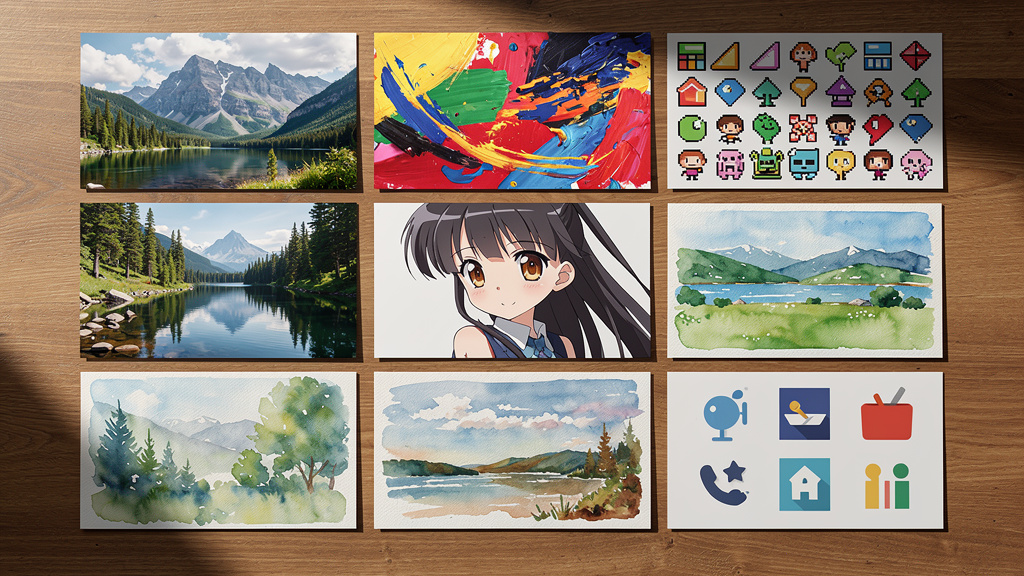
Most leading tools offer well over a hundred visual styles that cover:
- Realistic photos
- Digital painting and fine art
- Anime and comic styles
- Pixel art and icons
- Logo‑friendly graphics and flat illustrations
A user can move from a clean studio photo look to a painterly fantasy scene or a flat illustration with a small prompt change. This range helps teams match brand guidelines, speak to different audiences, and adapt images to channels such as LinkedIn, Instagram, pitch decks, or training portals without switching tools.
AI Model Selection And Quality Control
Some platforms let users choose between different AI models inside the same interface. One model may lean toward detailed realism, while another may favor bold artistic choices. By testing Gemini‑class systems or other high‑end engines, teams can find the right balance of speed, clarity, and style. This choice matters when you need steady, predictable results for campaigns rather than one‑off art experiments.
Flexible Output Parameters
Professional work often starts with basic questions about format. Strong generators let you choose from standard aspect ratios such as:
- Square (1:1) for feeds and profile images
- Tall portrait for stories and mobile‑first layouts
- Wide banners for hero images, email headers, and slides
Many also support batch generation, so you can create several versions from the same prompt in one run. That makes A/B testing, stakeholder review, and idea exploration much quicker, since you receive multiple options with a single click.
Resolution Tiers For Professional Applications
Not every task needs high resolution. Good tools reflect that by offering:
- Standard sizes for web content and thumbnails
- Larger HD options for polished digital projects
- Very high resolutions (2K or 4K) for print or large screens
For leaders, this lets teams pick quality levels that match the use case and budget. You can reserve premium tiers for final campaign assets while using fast, lower‑resolution drafts for internal review and concept work.
How To Generate AI Images: A Step-By-Step Guide
Although the technology behind an ai image generator online is complex, the workflow is very simple. This is why marketing teams, product managers, and trainers can adopt it quickly without extra headcount. The process comes down to four repeatable steps.
Step 1: Craft Your Text Prompt
Start by writing a clear description of the image you need. To keep prompts strong, cover:
- Subject: who or what the image is about
- Setting: location, background, or environment
- Colors and lighting: bright, dark, warm, cool, etc.
- Mood: formal, playful, calm, tense
- Action: what is happening in the scene
- Detail level: simple, minimal, or highly detailed
For example, instead of typing only office, write something like modern open office with large windows, natural light, mixed seating areas, plants, and a calm professional feel. Over time, many teams create shared prompt templates for frequent needs such as product shots, team images, dashboards, or training scenes.
Step 2: Select Style And Parameters
Next, choose a visual style that matches your brand or project. You might want:
- A photorealistic look for an ad
- A flat illustration for a slide
- A comic style for internal training
Set the aspect ratio to match the channel, such as a tall format for stories or a wide one for banners. If the tool supports it, decide how many variations you want and add negative prompts to rule out things you do not want to see.
Step 3: Generate And Iterate
Now click the generate button and wait a few seconds. Review the output and compare it to the vision in your head or brief. In many cases, the first result will be close but not perfect.
A simple loop works well:
- Generate an image from your initial prompt.
- Note what you like and what feels off.
- Edit the prompt with a few changes in style, detail, or mood.
- Regenerate and compare.
Two to four short cycles are common before teams settle on a clear winner.
Step 4: Download And Deploy
Once you are happy with the result, download the image in the highest resolution the project needs. Some ai image generator online platforms let you clean up the result on the spot with tools such as background removal, sharpening, or zooming out to expand the scene.
After that, you can drop the image into a social post, campaign creative, slide deck, landing page, or internal document, following your normal approval and asset management process.
Strategic Business Applications And Use Cases

For technology and business leaders, the power of an ai image generator online is not only in the novelty, but in how it supports specific outcomes, as demonstrated by research examining AI image generators’ influences and challenges across professional fields. When we advise clients at VibeAutomateAI, we map the tools to real workflows across teams.
Marketing And Advertising Teams
Marketing groups can move from single ideas to full campaign sets in a fraction of the time. A manager can generate dozens of ad variations for different audiences, headlines, and formats without waiting on a designer queue.
Social teams can use platforms like Scenario to fill content calendars with fresh visuals that match each platform rather than leaning on generic stock photos. Content marketers can pair every article or whitepaper with a custom image that reinforces the message, which helps with click‑through rates and time on page. All of this usually reduces spend on stock libraries and short freelance gigs.
“It’s not about ideas. It’s about making ideas happen.” — Scott Belsky
AI image tools help marketing teams make ideas visible fast enough to test and refine them.
Design And Product Development
Designers and product teams often need fast visual prototypes long before any final assets are approved. With tools like the AI Document Creator, a product manager can sketch interface concepts or packaging ideas through text and share them with stakeholders on the same day.
Designers can use the outputs as mood boards or starting points, then refine the best directions in their normal tools. This shifts their time from routine draft creation toward higher‑value decisions about layout, color, and interaction.
Business Operations And Small Businesses
Operations leaders and small business owners often wear many hats and rarely have a dedicated design staff. AI image generators allow them to produce logos, slide images, web banners, or training visuals with nothing but a clear description.
E‑commerce owners can generate lifestyle images that show products in context when they do not have resources for photo shoots. Internal teams can create visuals for reports or dashboards that help executives grasp trends faster, all without waiting on central design support.
Education And Training
Educators and trainers can use these tools to turn abstract ideas into images that make lessons stick. A trainer building a cyber incident tabletop exercise can generate scenes, characters, or diagrams that match the scenario. Course creators can add visual interest to e‑learning modules without buying extra art. This flexibility supports faster content refresh cycles and more engaging learning materials for staff or students.
Commercial Use, Copyright, And Ownership: What You Need To Know
The legal side of AI images is a common concern for CIOs, CISOs, and legal teams. While most platforms work hard to support business use, the rules still change as regulators and courts react to new technology. At VibeAutomateAI, we always suggest treating legal terms and record‑keeping as part of any ai image generator online rollout.
Commercial Use Permissions
Many text to image platforms state clearly that users may apply generated images in commercial contexts. That includes:
- Ads and social campaigns
- Product pages and websites
- Pitch decks and investor materials
- Physical packaging and printed media
In many cases the same rights apply whether the image came from a free or paid tier, though research comparing interpretation of AI-generated versus traditional images highlights ongoing questions about authenticity and usage. The key step is to read the current terms of service before using images in revenue‑linked projects and to record which platform supported which asset.
Copyright And Ownership Overview
Copyright for AI‑created art sits in a gray area in many countries. Some providers say that generated images fall into public domain, meaning there is no single owner in the classic sense. Others say users hold broad usage rights but not full exclusive copyright.
In practice this means you can usually use the image for business, but you may not be able to stop someone else from using a very similar one. Many platforms also allow use in NFTs and other digital goods. For core brand elements such as logos, we suggest a higher level of care that may include legal review and some human design work built on top of AI drafts.
Compliance And Best Practices
To manage risk, it helps to treat AI images like any other asset with governance. Practical steps include:
- Defining which teams can create assets and who must approve them
- Writing short internal guidelines on acceptable topics and brand fit
- Keeping a simple log of prompts, tools, and final uses for key assets
- Adding an extra review layer for regulated sectors such as finance or health
Regulated sectors may also want legal or compliance review for high‑impact campaigns. A light approval workflow for high‑visibility uses can go a long way toward managing legal and reputational risk.
Mastering Prompt Engineering For Professional Results
Prompt engineering sounds technical, but in practice it is just careful, structured writing. The better the prompt, the better the output you will receive from an ai image generator online. When we help teams adopt these tools, we often see skills grow quickly over a few short sessions.
Be Specific And Detailed
Short prompts tend to give bland, generic images. Instead, describe the main subject, what it is doing, the setting, lighting, mood, and camera angle.
Compare a single word like office with a fuller description such as glass corner office high above a city, late afternoon sun, clean desk with laptop, large meeting table, and a calm executive mood. Over time, teams can collect and share strong prompts for recurring needs, which keeps brand visuals steady and speeds up work.
Use Style And Medium Keywords
Style words tell the AI how the image should feel. You can guide it by adding phrases such as:
- Photorealistic
- Digital painting
- Watercolor illustration
- 3D render
- Vector art
- Pencil sketch
These terms steer the model toward certain textures, lighting choices, and levels of detail. Many companies go further and maintain a list of approved style words that match their brand book, so anyone on the team can stay on‑brand without guesswork.
Use Negative Prompting Effectively
Some platforms offer a second text box for things you want to avoid. This is called negative prompting. You can write phrases such as blurry, low detail, extra limbs, strange eyes, or unwanted text to cut down on common AI mistakes.
This is especially helpful when working with people, technical diagrams, or any content that must look clean and professional. Before rolling out a tool, check whether it supports negative prompts and test a few standard quality filters.
Iterate And Experiment Strategically
Strong results rarely appear on the very first try. Treat each generation as a fast draft. Look at what is missing, then adjust only one or two parts of the prompt at a time, such as lighting or camera angle, so you can see what changes.
The cost of extra attempts on most free or low‑cost platforms is close to zero, which makes broad experiments easy. Save prompts that work well in a shared document so your whole team can reuse and refine them.
Integration Options: APIs And Enterprise Implementation
For many enterprises, the real power of an ai image generator online arrives when it connects to existing systems through an API. Many providers, such as DeepAI, offer simple REST endpoints for text to image generation. Development teams can call these from websites, internal tools, or automation platforms.
This allows marketing systems to request images when new articles go live, or e‑commerce platforms to create fresh visuals for new product records. Internal design tools can include preset styles and negative prompts that match your brand, while still giving users prompt freedom. Customer‑facing apps can offer personalized graphics, avatars, or event banners on demand.
When we at VibeAutomateAI advise on such integrations, we highlight rate limits, security, logging, and quality control as key topics. A small internal pilot often gives enough data on speed, cost, and user reaction to justify a wider rollout.
Conclusion
Free ai image generator online tools have turned text into a fast path to visuals. What once needed design software, outside agencies, or long lead times now often takes a few minutes and a clear prompt. That shift means marketing, product, operations, and training teams can move faster while spending less on basic creative work.
These tools also flatten access to visual content. People who never opened a design program can now test campaign ideas, explain complex topics, or make learning materials more engaging with very little friction. There is a learning curve around prompts and a need for simple rules on copyright, brand fit, and compliance, but those challenges are easy to manage with a bit of structure.
The next step is action. Identify two or three high‑payoff use cases, such as ad concepts, training visuals, or quick prototypes, and run a focused pilot. Then explore API options if you see value at scale. At VibeAutomateAI, we concentrate on helping CIOs, IT leaders, and business managers compare tools, design guardrails, and connect AI image generation to wider automation and security strategies so they can move fast with confidence.
FAQs
What Is The Best Free AI Image Generator Online?
There is no single best ai image generator online for every organization. The right fit depends on needs such as resolution, style range, ease of use, and whether you require an API. Tools like DeepAI, Canva with AI features, and Microsoft Designer are often mentioned for business use. At VibeAutomateAI, we suggest testing several options with the same prompts and workflows, then standardizing on the one that fits your quality, legal, and integration needs.
Can I Use AI-Generated Images For Commercial Purposes?
In most cases, yes. Many free and paid AI platforms allow commercial use of generated images in ads, websites, printed materials, and products. The important step is to read the platform’s current terms of service before launch and keep a record of which assets came from which tool. For high‑profile branding work or regulated sectors, legal review is wise to confirm that rights and risk levels match your comfort level.
Do I Need Design Skills To Use An AI Image Generator?
Traditional design skills are not required. The core skill is the ability to describe what you want in clear, concrete language that the ai image generator online can interpret. Most users see solid results after only a few attempts, and prompts improve with practice. Design teams can still add a lot of value by turning AI outputs into polished final assets, but non‑designers can now handle many day‑to‑day visuals on their own.
How Do I Write Effective Prompts For AI Image Generation?
Effective prompts are detailed and structured. Describe the subject, what it is doing, the setting, colors, lighting, mood, and style. Add words such as photorealistic, watercolor, digital painting, or 3D render to guide the look. If the platform supports it, add negative prompts to exclude low quality, blur, or odd body features. A simple pattern such as subject + action + environment + lighting + style + mood works well for many business cases.
Are There Any Limitations To Free AI Image Generators?
Free tiers often come with trade‑offs such as lower maximum resolution, limits on daily generations, or slower processing during busy periods. Some tools may show small quality issues, especially with hands, text, or very complex scenes. Certain niche styles may only be available in paid plans, and very high‑volume use usually requires a paid API. There is also ongoing legal debate around copyright, so businesses should stay informed and apply basic governance when using AI images at scale.
Stay connected